***
title: Customizing theme using query parameters
slug: customization/customising-theme-using-query-parameters
subtitle: Customize the look and feel of the Transak widget
-----------------------------------------------------------
Use Transak's theme-related query parameters in `widgetParams` to customize button colors, color mode, and the full widget theme.
Pass these parameters in the [Create Widget URL API](/api/public/create-widget-url) request body when generating a `widgetUrl`.
`apiKey` and `referrerDomain` are mandatory in `widgetParams` for all examples on this page.
## Primary Button Colors
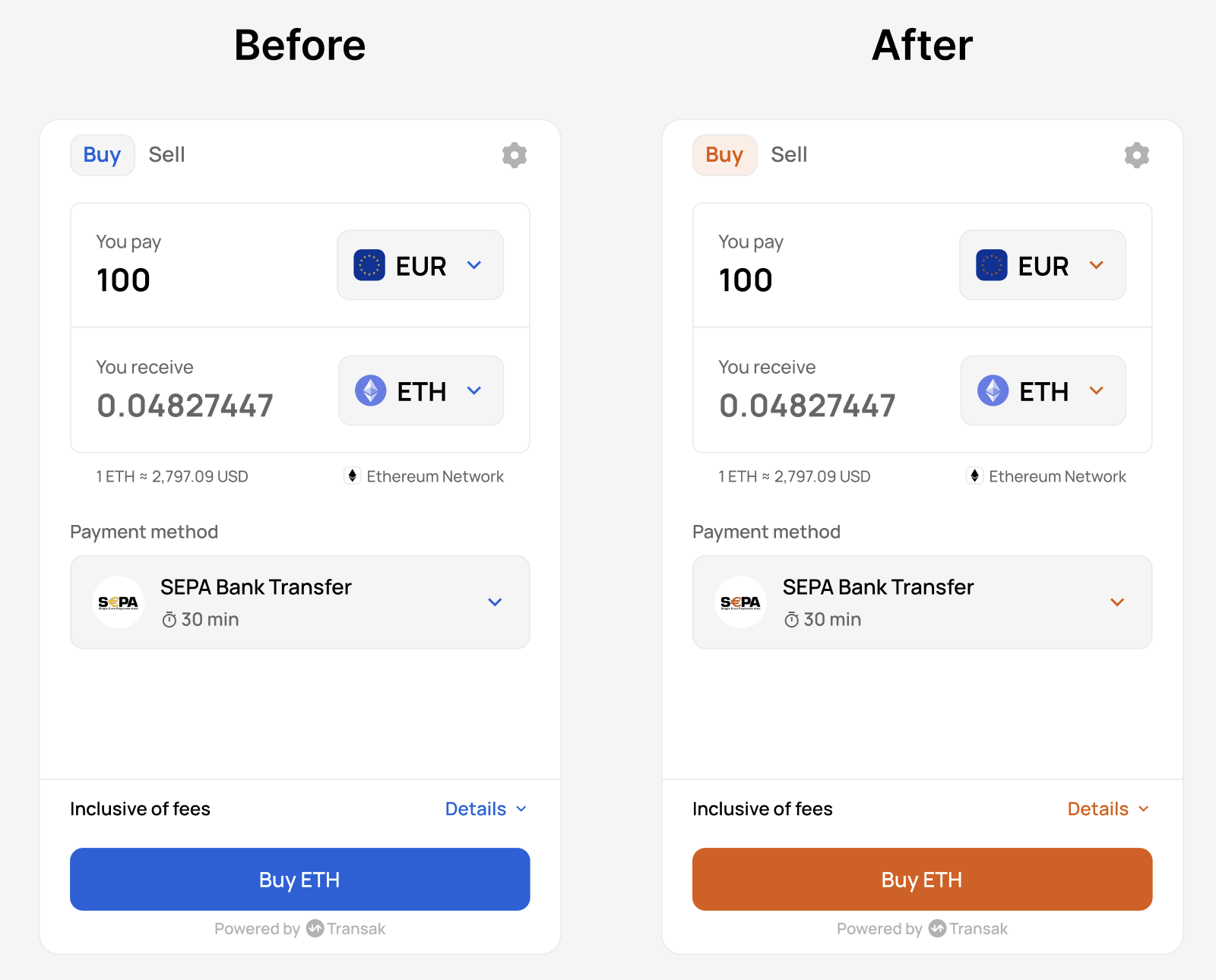
Use these parameters to customize the primary button background and text color.
| Parameter | Description |
| :----------------------- | :---------------------------------- |
| `primaryButtonFillColor` | Hex color for the button background |
| `primaryButtonTextColor` | Hex color for the button text |
**Sample Result**
Primary CTA button restyled to match brand mustard and dark grey text using `primaryButtonFillColor` and `primaryButtonTextColor`.
 **Sample Request**
```bash
curl --request POST \
--url https://api-gateway-stg.transak.com/api/v2/auth/session \
--header 'accept: application/json' \
--header 'access-token: YOUR_ACCESS_TOKEN' \
--header 'content-type: application/json' \
--data '{
"widgetParams": {
"apiKey": "YOUR_API_KEY",
"referrerDomain": "yourdomain.com",
"primaryButtonFillColor": "#F59E0B",
"primaryButtonTextColor": "#0B0B0B"
}
}'
```
## Color Mode
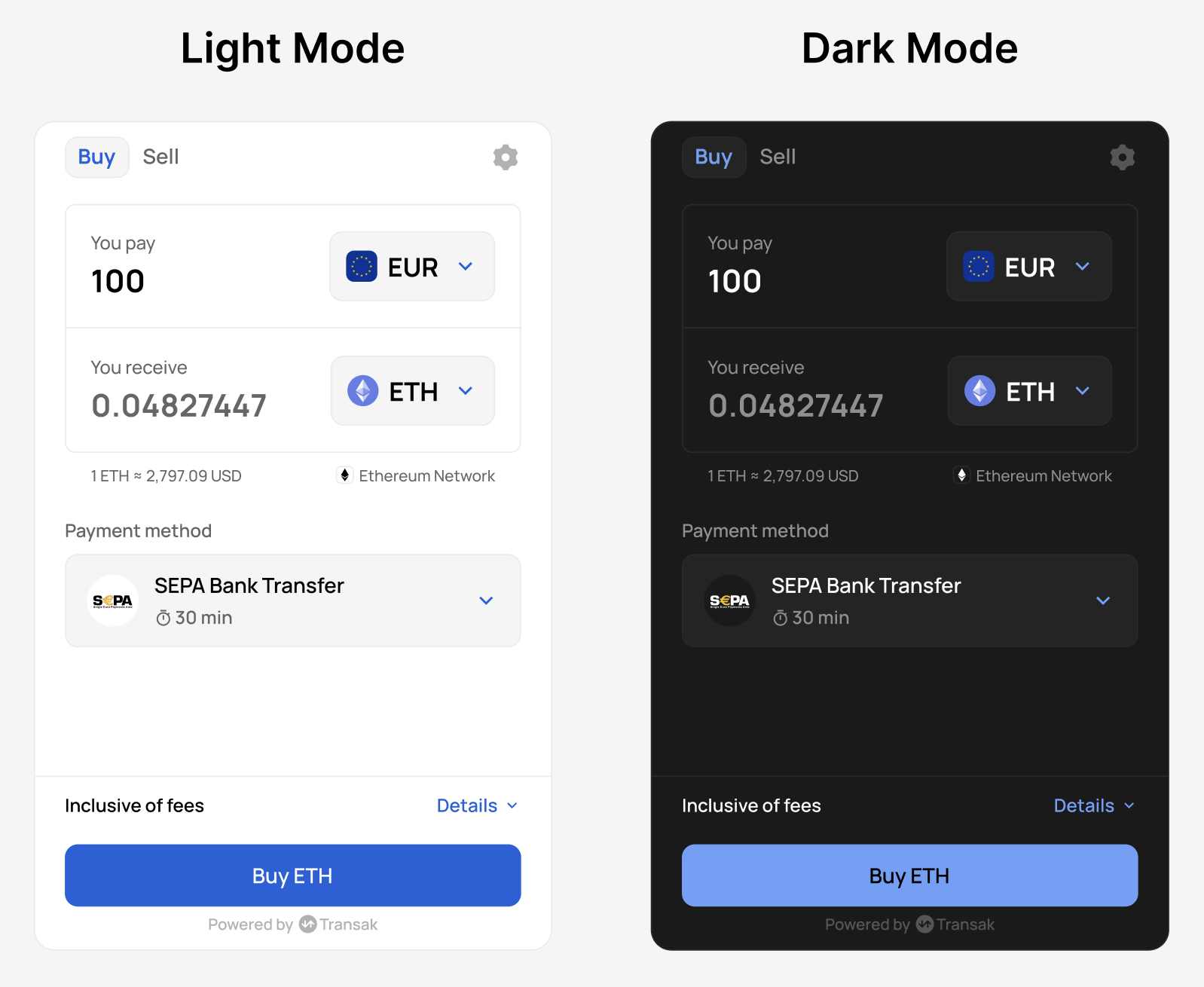
Use `colorMode` to switch the widget between light and dark themes.
| Parameter | Allowed values | Description |
| :---------- | :-------------- | :------------------------- |
| `colorMode` | `LIGHT`, `DARK` | Sets the widget theme mode |
**Sample Result**
**Sample Request**
```bash
curl --request POST \
--url https://api-gateway-stg.transak.com/api/v2/auth/session \
--header 'accept: application/json' \
--header 'access-token: YOUR_ACCESS_TOKEN' \
--header 'content-type: application/json' \
--data '{
"widgetParams": {
"apiKey": "YOUR_API_KEY",
"referrerDomain": "yourdomain.com",
"primaryButtonFillColor": "#F59E0B",
"primaryButtonTextColor": "#0B0B0B"
}
}'
```
## Color Mode
Use `colorMode` to switch the widget between light and dark themes.
| Parameter | Allowed values | Description |
| :---------- | :-------------- | :------------------------- |
| `colorMode` | `LIGHT`, `DARK` | Sets the widget theme mode |
**Sample Result**
 **Sample Request**
```bash
curl --request POST \
--url https://api-gateway-stg.transak.com/api/v2/auth/session \
--header 'accept: application/json' \
--header 'access-token: YOUR_ACCESS_TOKEN' \
--header 'content-type: application/json' \
--data '{
"widgetParams": {
"apiKey": "YOUR_API_KEY",
"referrerDomain": "yourdomain.com",
"colorMode": "DARK"
}
}'
```
## Complete Theme Customization
Use the following parameters together to fully align the widget with your brand.
### Brand and Text Colors
| Parameter | Description |
| :------------------- | :---------------------------------------- |
| `brandColor` | Primary brand color for accents and links |
| `textPrimaryColor` | Primary text color |
| `textSecondaryColor` | Secondary or muted text color |
| `labelTextColor` | Form label text color |
### Surface and Background Colors
| Parameter | Description |
| :-------------------------- | :-------------------------------- |
| `surfaceFillColor` | Card or surface background |
| `widgetBackgroundFillColor` | Widget container background |
| `borderColor` | Border color for inputs and cards |
### Status Colors
| Parameter | Description | Example value |
| :----------- | :------------------------ | :------------ |
| `greenColor` | Success or positive state | `#10B981` |
| `redColor` | Error or negative state | `#EF4444` |
### Putting It All Together
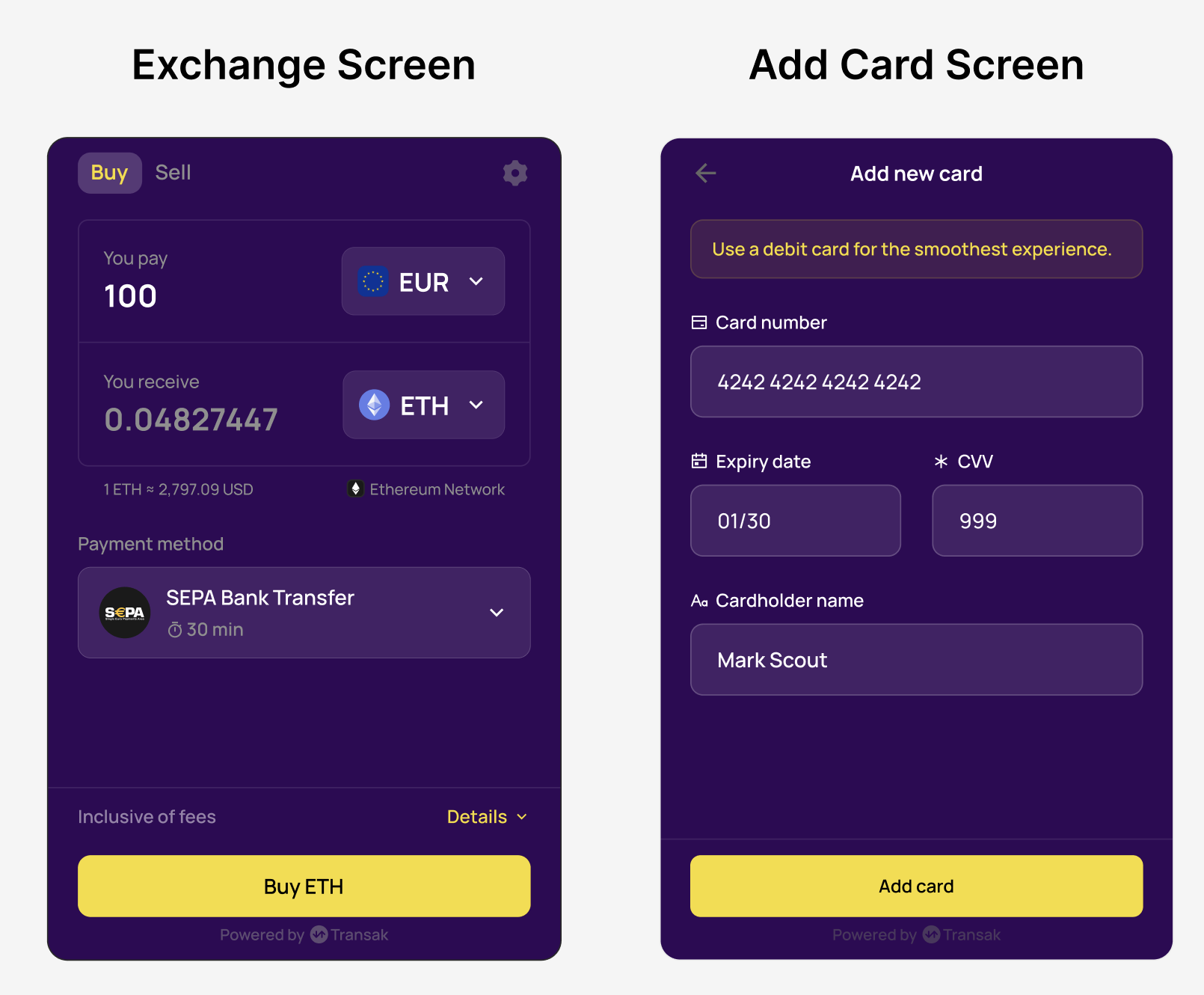
Below is an example combining color mode, primary button styling, and full theme customization into a single widget URL flow.
**Sample Result**
**Sample Request**
```bash
curl --request POST \
--url https://api-gateway-stg.transak.com/api/v2/auth/session \
--header 'accept: application/json' \
--header 'access-token: YOUR_ACCESS_TOKEN' \
--header 'content-type: application/json' \
--data '{
"widgetParams": {
"apiKey": "YOUR_API_KEY",
"referrerDomain": "yourdomain.com",
"colorMode": "DARK"
}
}'
```
## Complete Theme Customization
Use the following parameters together to fully align the widget with your brand.
### Brand and Text Colors
| Parameter | Description |
| :------------------- | :---------------------------------------- |
| `brandColor` | Primary brand color for accents and links |
| `textPrimaryColor` | Primary text color |
| `textSecondaryColor` | Secondary or muted text color |
| `labelTextColor` | Form label text color |
### Surface and Background Colors
| Parameter | Description |
| :-------------------------- | :-------------------------------- |
| `surfaceFillColor` | Card or surface background |
| `widgetBackgroundFillColor` | Widget container background |
| `borderColor` | Border color for inputs and cards |
### Status Colors
| Parameter | Description | Example value |
| :----------- | :------------------------ | :------------ |
| `greenColor` | Success or positive state | `#10B981` |
| `redColor` | Error or negative state | `#EF4444` |
### Putting It All Together
Below is an example combining color mode, primary button styling, and full theme customization into a single widget URL flow.
**Sample Result**
 **Sample Request**
```bash
curl --request POST \
--url https://api-gateway-stg.transak.com/api/v2/auth/session \
--header 'accept: application/json' \
--header 'access-token: YOUR_ACCESS_TOKEN' \
--header 'content-type: application/json' \
--data '{
"widgetParams": {
"apiKey": "YOUR_API_KEY",
"referrerDomain": "yourdomain.com",
"brandColor": "#F6DC2D",
"textPrimaryColor": "#FFFFFF",
"textSecondaryColor": "#8F8F8F",
"labelTextColor": "#FFFFFF",
"surfaceFillColor": "#452167",
"widgetBackgroundFillColor": "#300856",
"borderColor": "#6A4D85",
"greenColor": "#34D399",
"redColor": "#EF4444"
}
}'
```
**Sample Request**
```bash
curl --request POST \
--url https://api-gateway-stg.transak.com/api/v2/auth/session \
--header 'accept: application/json' \
--header 'access-token: YOUR_ACCESS_TOKEN' \
--header 'content-type: application/json' \
--data '{
"widgetParams": {
"apiKey": "YOUR_API_KEY",
"referrerDomain": "yourdomain.com",
"brandColor": "#F6DC2D",
"textPrimaryColor": "#FFFFFF",
"textSecondaryColor": "#8F8F8F",
"labelTextColor": "#FFFFFF",
"surfaceFillColor": "#452167",
"widgetBackgroundFillColor": "#300856",
"borderColor": "#6A4D85",
"greenColor": "#34D399",
"redColor": "#EF4444"
}
}'
```