***
title: Auth Reliance
slug: features/auth-reliance
subtitle: Authenticate users without requiring re-login into Transak's flow
---------------------------------------------------------------------------
**Auth Reliance** allows partners to authenticate users without requiring them to re-login into the Transak authentication flow. This feature is exclusively available for [Whitelabel API integrations](/integration/api).
## Problem Statement
Integrating third-party payment services often forces users to create separate accounts and log in multiple times, disrupting the user experience and increasing friction in the conversion funnel.
Here are some of the **key challenges** with traditional authentication flows in payment integrations:
Redundant authentication
Users must re-authenticate with third-party services even though they're already logged into your platform.
Higher drop-off rates
Additional authentication steps create friction points that lead to user abandonment and lower conversion rates.
Poor user experience
Users are confused about why they need to create yet another account or log in again during payment flows.
Slower transaction flows
Multiple login steps add unnecessary delays to time-sensitive payment transactions.
## Our Solution
Auth Reliance eliminates redundant logins by allowing partners to pass authenticated user credentials directly to Transak, creating a seamless, uninterrupted payment experience.
Here are some of the **key benefits** of the Auth Reliance solution:
Seamless Authentication
Users stay authenticated without re-entering credentials or creating new accounts.
Higher Conversion
Reduce friction and drop-offs by eliminating redundant authentication steps.
Better UX
Keep users in your app's flow without disrupting their journey.
Backend Security
Server-to-server authentication with IP whitelisting ensures secure transactions.
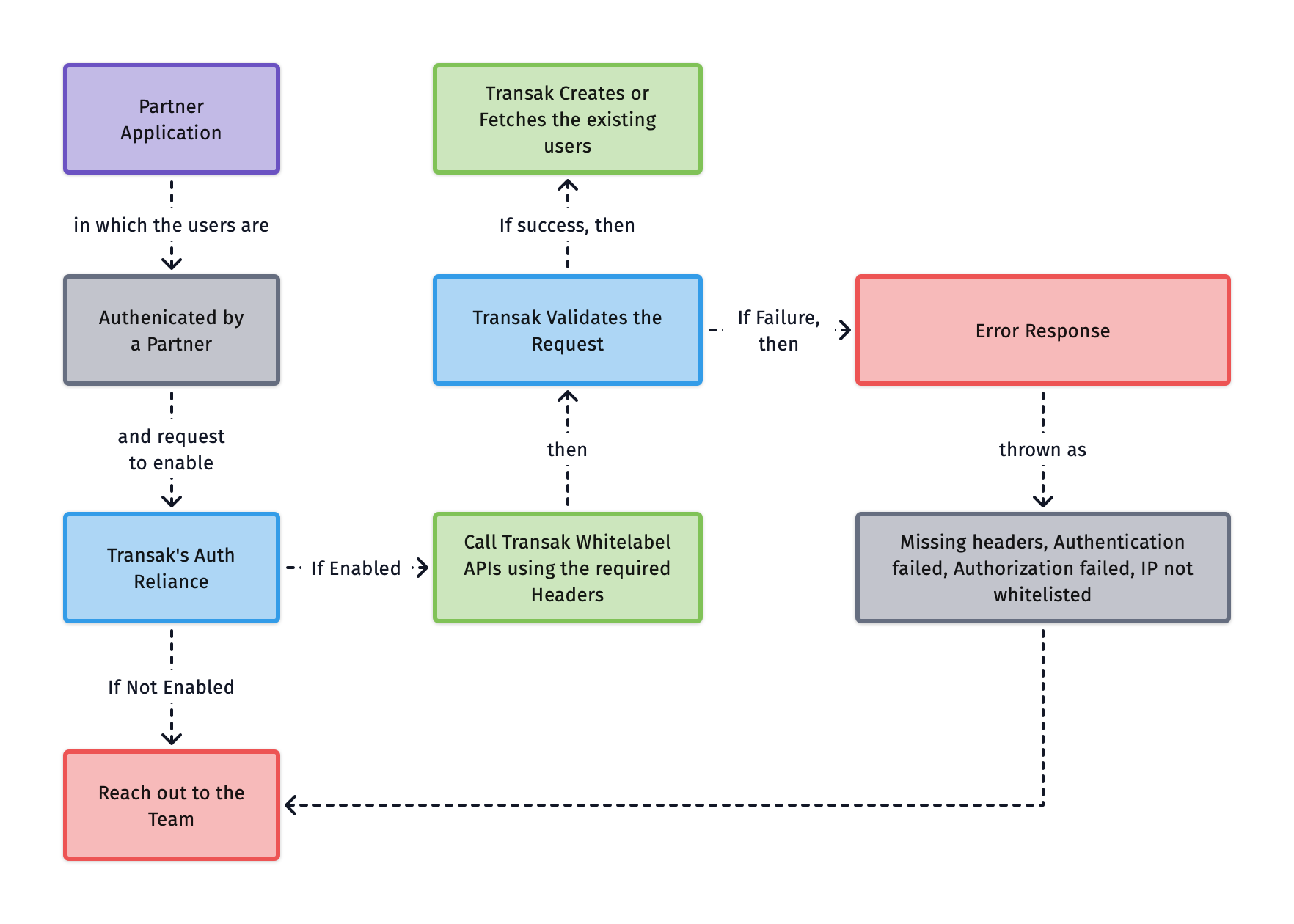
## How does it work?
## Current Limitations
Auth Reliance APIs are to be called only from the partner backend and subjected to the whitelisting of partner IP addresses. Direct API calls from the frontend apps are not supported.
### Payment Methods
Supported
Payment Methods
Yes
Bank transfers, Open banking
No
Cards, Apple Pay, Google Pay
## How to integrate?
### Enable Auth Reliance
Follow the steps in the [Need help in Integration](/getting-started/help-and-support#need-help-in-integration) section to reach us. Then raise the request to enable **Auth Reliance** for your API key.
Share your public IP addresses with Transak for whitelisting.
### Configuration
Include these headers in your [Whitelabel API requests](/api/whitelabel) :
Partner access token (see [guide](/guides/how-to-create-partner-access-token))
User's email address
 ## Current Limitations