> For a complete page index, fetch https://docs.transak.com/llms.txt

# Headless ACH Pull

**Headless ACH Pull** (also known as **Instant Bank Transfer**) is a lightweight, embeddable module that lets `US` users link a bank account and pay via ACH debit directly within your own application, without loading the Transak widget.

Retrieve a user's previously connected bank accounts, enabling one step checkout without relinking a bank.

Verifies the user's mobile number and renders the bank-linking UI via the Transak SDK for a new bank account.

## Problem Statement

Currently, Transak requires loading the full widget for ACH Pull payments, which forces users to go through multiple screens before they can link a bank account and pay. This creates friction and limits partner control over the payment experience.

Here are some of the **key challenges** with the current approach:

<table>
  <tbody>
    <tr>
      <td>
        <strong>
          Full widget required
        </strong>

        Partners must load the entire Transak widget to accept ACH Pull payments.
      </td>
    </tr>

    <tr>
      <td>
        <strong>
          Multiple screens before payment
        </strong>

        Users navigate through several Transak screens before they ever reach bank linking, increasing drop-off risk.
      </td>
    </tr>

    <tr>
      <td>
        <strong>
          Disconnected payment experience
        </strong>

        The bank-linking and payment flow feels separate from the partner's own UI, breaking the continuity.
      </td>
    </tr>

    <tr>
      <td>
        <strong>
          Limited partner control
        </strong>

        Partners have no control over when or where the bank-linking flow appears — placement and styling are determined by the widget.
      </td>
    </tr>
  </tbody>
</table>

## Our Solution

Headless ACH Pull exposes bank-account linking and payment as a standalone, embeddable flow. Partners control where it sits, how it looks, and what happens after payment. Transak handles the bank linking and ACH debit infrastructure in the background.

Here are some of the **key benefits** of the Headless ACH Pull solution:

<table>
  <tbody>
    <tr>
      <td>
        <strong>
          Just the bank-linking flow
        </strong>

        Embed only the mobile verification and bank-linking flow.
      </td>
    </tr>

    <tr>
      <td>
        <strong>
          Fewer steps to payment
        </strong>

        Returning users with a connected bank account can check out without opening a widget.
      </td>
    </tr>

    <tr>
      <td>
        <strong>
          Seamless checkout integration
        </strong>

        The bank-linking flow sits inside the partner's own checkout UI, keeping the experience continuous.
      </td>
    </tr>

    <tr>
      <td>
        <strong>
          Full partner control
        </strong>

        Partners decide where the flow appears, how it looks, and what happens after payment.
      </td>
    </tr>
  </tbody>
</table>

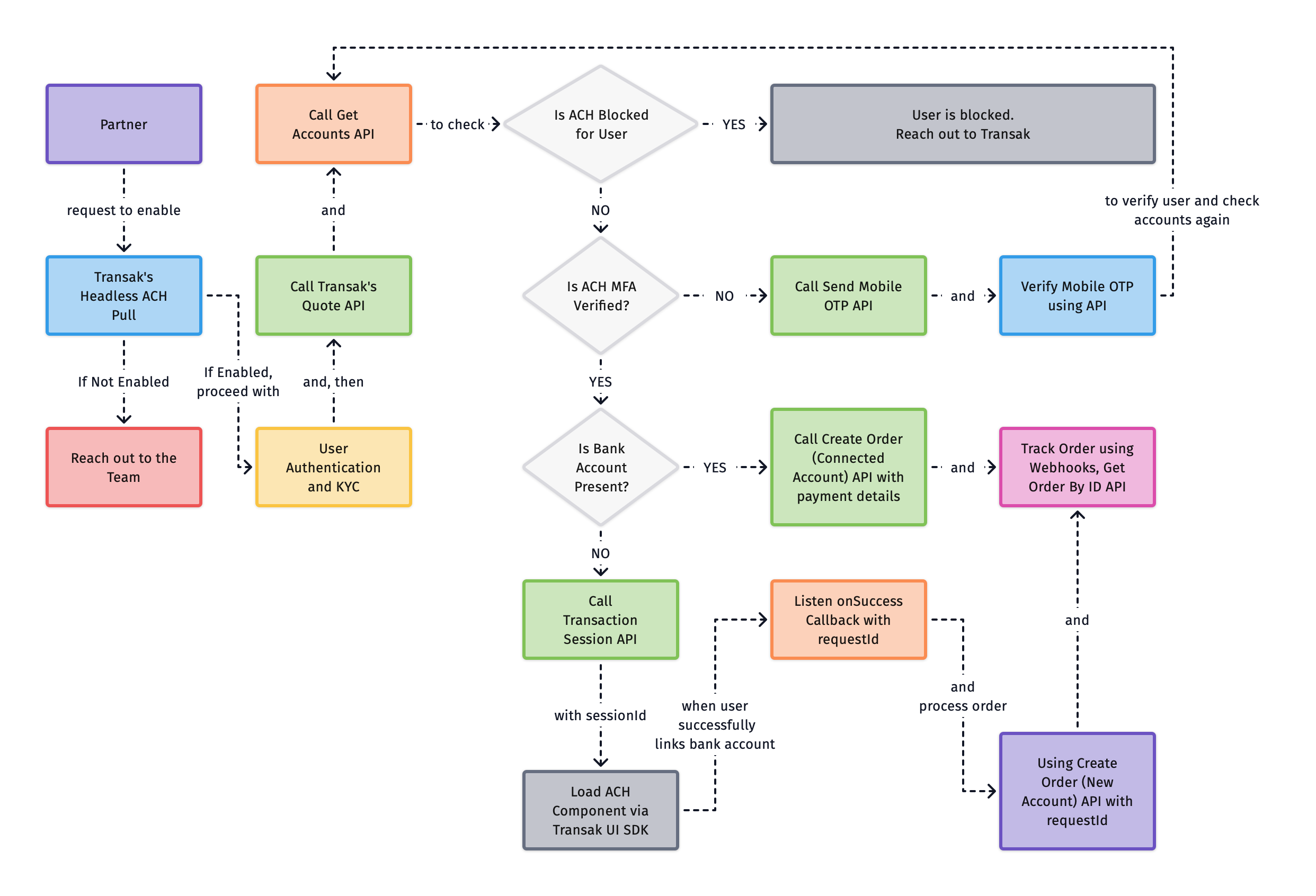
## How does it work?

<img src="https://files.buildwithfern.com/visual-editor-images/transak-labs.docs.buildwithfern.com/2026-07-14T16:07:37.583Z/features/headless-ach-pull/headless-ach-pull.png" alt="headless-ach-pull" title="headless-ach-pull" />

## Current Limitations

<table>
  <thead>
    <tr>
      <th>
        Limitation
      </th>

      <th>
        Details
      </th>
    </tr>
  </thead>

  <tbody>
    <tr>
      <td>
        <strong>
          US users only
        </strong>
      </td>

      <td>
        ACH Pull is only supported for `US` region users transacting in `USD`, and requires a `US` phone number for bank-account linking.
      </td>
    </tr>

    <tr>
      <td>
        <strong>
          Headless ACH Pull APIs
        </strong>
      </td>

      <td>
        APIs are to be called only from the partner backend and subjected to the whitelisting of partner IP addresses. We don't support API calls from the frontend due to security restrictions.
      </td>
    </tr>

    <tr>
      <td>
        <strong>
          Supported for JS, React, and React Native integrations
        </strong>
      </td>

      <td>
        The Transak UI SDK is available for JS, React, and React Native integrations.
      </td>
    </tr>

    <tr>
      <td>
        <strong>
          OTP attempt limit
        </strong>
      </td>

      <td>
        5 invalid OTP attempts will block the user's account. The user will need to reach out to Transak for unblocking.
      </td>
    </tr>
  </tbody>
</table>

## How to integrate?

| Action                                                                                                                 |
| ---------------------------------------------------------------------------------------------------------------------- |
| Follow the steps in the [Need help in Integration](/getting-started/help-and-support#need-help-in-integration) section |
| Request **API key whitelisting** and ask to **enable Headless ACH Pull** for your API key                              |
| Share your public IP addresses with Transak for whitelisting to use our APIs in your backend                           |

You can use either of the following authentication options:

| Option               | Description                                                                                                                                                                                                                                                                                                 |
| -------------------- | ----------------------------------------------------------------------------------------------------------------------------------------------------------------------------------------------------------------------------------------------------------------------------------------------------------- |
| **White-label Auth** | Use the standard Transak authentication flow to generate a user access token. Partners can do this by calling the [Send User OTP API](/api/whitelabel/user/send-user-otp) followed by the [Verify User API](/api/whitelabel/user/verify-user-otp) to generate the access token.<br /><br />Learn more<br /> |
| **Auth Reliance**    | Use [Auth Reliance](/features/auth-reliance) by passing these headers with every request: `x-user-identifier` and `x-access-token`                                                                                                                                                                          |

Please refer to the tutorial on [how to create partner access token](/guides/how-to-create-partner-access-token).

KYC is a mandatory step in compliance with regulatory requirements. Each user should be KYC Approved. You can use either of the following KYC options:

| Option                      | Description                                                                                                                                                               |
| --------------------------- | ------------------------------------------------------------------------------------------------------------------------------------------------------------------------- |
| **White label KYC**         | Partners can collect the required KYC information on their end and then forward it to Transak for review and approval. Learn more: [Whitelabel KYC](/integration/api#kyc) |
| **KYC Reliance via Sumsub** | Partners can share their KYC data from their platform with Transak using Sumsub. Learn more: [KYC Reliance Guide](/features/kyc-reliance#using-sumsub)                    |

Call the [Get Quote API](https://docs.transak.com/api/whitelabel/lookup/get-quote) to get a quote for the transaction. Pass the apiKey, fiat amount, fiat currency, crypto currency, network, and order type.

Set `paymentMethod` to `pm_ach_pull` while creating a quote. ACH Pull only supports `USD` as the fiat currency.

A successful response returns a `quoteId`.

Call the [Get Accounts API](/api/whitelabel/payments/headless-ach-pull/get-accounts) with `paymentInstrumentId` set to `pm_ach_pull` to check whether the user already has a connected bank account.

A successful response returns `bankAccounts`, `isAchMFAVerified`, and `isAchBlocked`.

| Case                                                                                | Next step                                                                                                                                                                                                                                                                                                                                       |
| ----------------------------------------------------------------------------------- | ----------------------------------------------------------------------------------------------------------------------------------------------------------------------------------------------------------------------------------------------------------------------------------------------------------------------------------------------- |
| `isAchBlocked = true`                                                               | The user is blocked from using ACH Pull. Reach out to Transak                                                                                                                                                                                                                                                                                   |
| `isAchMFAVerified = false`                                                          | Call the [Send Mobile OTP API](/api/whitelabel/payments/headless-ach-pull/send-mobile-otp) and [Verify Mobile OTP API](/api/whitelabel/payments/headless-ach-pull/verify-mobile-otp) to verify the user's mobile number, then call the [Get Accounts API](/api/whitelabel/payments/headless-ach-pull/get-accounts) again for the updated status |
| No connected bank account, `isAchBlocked = false`, and `isAchMFAVerified = true`    | [Create a transaction session](/features/headless-ach-pull#create-a-transaction-session-using-backend-only) to link a new bank account                                                                                                                                                                                                          |
| Connected bank account found, `isAchBlocked = false`, and `isAchMFAVerified = true` | Go to [Place order using the connected account](#place-order-using-the-connected-account-using-backend-only)                                                                                                                                                                                                                                    |

If the user has a connected bank account, call the [Create Order (Connected Account) API](/api/whitelabel/payments/headless-ach-pull/create-order-with-connected-account) from your backend using below parameters.

| Parameter             | Description                                                                                        |
| --------------------- | -------------------------------------------------------------------------------------------------- |
| `quoteId`             | Quote ID returned by the [Get Quote API](https://docs.transak.com/api/whitelabel/lookup/get-quote) |
| `paymentInstrumentId` | Always `pm_ach_pull`                                                                               |
| `walletAddress`       | The user's wallet address for the selected cryptocurrency and network                              |
| `paymentIdentifierId` | The connected bank account's identifier returned by the Get Accounts API                           |

A successful response returns the full order details, including `orderId` and `status`. Continue with the [Track the order](#track-the-order-using-backend-only) step below.

If the user has no connected bank account, call the [Send Mobile OTP API](/api/whitelabel/payments/headless-ach-pull/send-mobile-otp) from your backend with the user's `US` `mobileNumber`.

A successful response returns a `mfaSessionId`.

Call the [Verify Mobile OTP API](/api/whitelabel/payments/headless-ach-pull/verify-mobile-otp) from your backend with the `mfaSessionId` from the previous step and the `code` the user received on their mobile number.

Call the [Transaction Session API](/api/whitelabel/payments/headless-ach-pull/transaction-session-api) from your backend using the `quoteId` and the user's wallet address. You can optionally pass a `config` object to customise the color mode of the bank-linking component.

| Parameter       | Description                                                                                                           |
| --------------- | --------------------------------------------------------------------------------------------------------------------- |
| `quoteId`       | Quote ID returned by the [Get Quote API](https://docs.transak.com/api/whitelabel/lookup/get-quote) in an earlier step |
| `walletAddress` | The user's wallet address for the selected cryptocurrency and network                                                 |
| `config`        | Optional. `colorMode` (`DARK` or `LIGHT`) to theme the bank-linking component                                         |

A successful response returns a `sessionId`.

Use the Transak UI SDK to render the bank-linking component. Pass the `sessionId` received in the previous step.

The video below shows the ACH Pull bank-linking flow. This entire flow runs through the Embeddable Transak UI.

<br />

```bash
npm install @transak/ui-components
```

```tsx
import { createTransakAchPull } from '@transak/ui-components';

const achPull = createTransakAchPull({
  sessionId, // sessionId from previous step
  environment, // 'STAGING' | 'PRODUCTION'
  onReady: () => {
    // Component is ready
  },
  onSuccess: ({ requestId }) => {
    // Bank linked — use requestId in the next step
  },
  onError: ({ code }) => {
    // Handle error
  },
  onClose: () => {
    // Customer dismissed the bank-linking widget
  },
});

await achPull.mount('ach-pull-slot');

// and then
achPull.unmount();
```

```bash
npm install @transak/ui-components-react
```

```tsx
import { TransakAchPull } from '@transak/ui-components-react';

<TransakAchPull
  sessionId={sessionId} // sessionId from previous step
  environment={environment} // 'STAGING' | 'PRODUCTION'
  onReady={() => {
    // Component is ready
  }}
  onSuccess={({ requestId }) => {
    // Bank linked — use requestId in the next step
  }}
  onError={({ code }) => {
    // Handle error
  }}
  onClose={() => {
    // Customer dismissed the bank-linking widget
  }}
/>
```

```bash
npm install @transak/ui-components-rn
```

```tsx
import { TransakAchPull } from '@transak/ui-components-rn';

<TransakAchPull
  sessionId={sessionId} // sessionId from previous step
  environment={environment} // 'STAGING' | 'PRODUCTION'
  onReady={() => {
    // Component is ready
  }}
  onSuccess={({ requestId }) => {
    // Bank linked — use requestId in the next step
  }}
  onError={({ code }) => {
    // Handle error
  }}
  onClose={() => {
    // Customer dismissed the bank-linking widget
  }}
/>
```

**Error codes**

The `onError` callback receives a `code` value. Use it to handle specific failure scenarios:

| Code                  | Description                                                     |
| --------------------- | --------------------------------------------------------------- |
| `CONFIG_LOAD_FAILED`  | ACH Pull configuration could not be loaded                      |
| `BANK_LINKING_FAILED` | Bank-account linking failed                                     |
| `INVALID_OPTIONS`     | Invalid or missing options passed to the SDK                    |
| `IFRAME_LOAD_FAILED`  | The embedded iframe failed to load                              |
| `INVALID_STATE`       | SDK method called in an unexpected state                        |
| `OAUTH_LAUNCH_FAILED` | React Native only. Failed to launch the OAuth bank-linking flow |

Once the SDK fires `onSuccess` with a `requestId`, call the [Create Order (New Account) API](/api/whitelabel/payments/headless-ach-pull/create-order-for-ach-pull) from your backend using the `requestId` to complete the payment and create the order.

A successful response returns the full order details, including `orderId` and `status`.

The Create Order response already contains the `orderId` and `status`. Use the [Get Order by ID](https://docs.transak.com/api/public/get-order-by-order-id) API to poll for full order details until the status reaches a terminal state.

## API Overview

Retrieves the user's connected bank accounts and ACH Pull verification status.

Sends an OTP to the user's mobile number to begin the bank-linking flow.

Verifies the OTP code sent to the user's mobile number.

Creates a transaction session using a quote ID and wallet address, returns a `sessionId` to initialise the bank-linking component.

Places a crypto buy order using a newly linked bank account, based on the `requestId` returned by the SDK's onSuccess callback.

Places a crypto buy order using a previously connected bank account.

## API Errors

| HTTP Status | Error Code | Message                                                                                                          |
| ----------- | ---------- | ---------------------------------------------------------------------------------------------------------------- |
| 400         | 9001       | Validation failed — missing/unsupported paymentInstrumentId, or missing/invalid quoteId for a bank-transfer rail |
| 401         | 1002       | Invalid or missing authentication token.                                                                         |
| 403         | 2030       | Your account has been disabled. Please get in touch with us at [fraud@transak.com](mailto:fraud@transak.com)     |
| 403         | 6019       | Unable to fetch ACH user state (no Aeropay user yet / provider error)                                            |

| HTTP Status | Error Code | Message                                                             |
| ----------- | ---------- | ------------------------------------------------------------------- |
| 400         | 9001       | mobileNumber must be a valid E.164 phone number (e.g. +12223339999) |
| 403         | 6017       | Cannot create user                                                  |

| HTTP Status | Error Code | Message           |
| ----------- | ---------- | ----------------- |
| 400         | 6018       | Cannot verify otp |

| HTTP Status | Error Code | Message                                                                                |
| ----------- | ---------- | -------------------------------------------------------------------------------------- |
| 401         | 1002       | Invalid or missing authentication token.                                               |
| 422         | 6002       | KYC is not approved. Please complete KYC before creating a session.                    |
| 422         | 6003       | This feature is not enabled for your account. Please contact support.                  |
| 422         | 6005       | Quote not found or could not be loaded.                                                |
| 422         | 6005       | This payment method is not currently supported. Please try a different payment method. |
| 422         | 6006       | The provided wallet address is invalid for the selected cryptocurrency and network.    |
| 422         | 6015       | User is blocked from using ACH. Please contact support.                                |
| 422         | 6016       | Unable to verify user for ACH payment.                                                 |
| 422         | 6021       | User verification is required for ACH. Please complete verification before continuing. |
| 500         | 6005       | Failed to create a session for the user.                                               |

| HTTP Status | Error Code | Message                                                                   |
| ----------- | ---------- | ------------------------------------------------------------------------- |
| 409         | 4005       | Order exists                                                              |
| 422         | 4001       | Invalid wallet address. Please provide a valid wallet address to proceed. |
| 422         | 4013       | Minimum amount should be more than \{amount}.                             |
| 422         | 4015       | Invalid payment method for currency combination                           |
| 422         | 4016       | FCA criteria not met, Please complete the assessments.                    |
| 422         | 6011       | KYC requirement is not approved for this transaction.                     |
| 500         | 4006       | Unable to create order                                                    |
| 500         | 4021       | Something went wrong, try again later!                                    |
| 500         | 6099       | Unable to process the order. Please try again.                            |