***
title: How to Track Order Status
slug: guides/track-order-status
subtitle: 'Monitor order lifecycle with APIs, webhooks, and WebSocket updates'
------------------------------------------------------------------------------
Track the status of user orders and receive real-time updates using any of the following integration options:
Poll order status on demand or for reconciliation.
Receive push notifications when order status changes.
Subscribe to near real-time order status streams.
## Order Flow
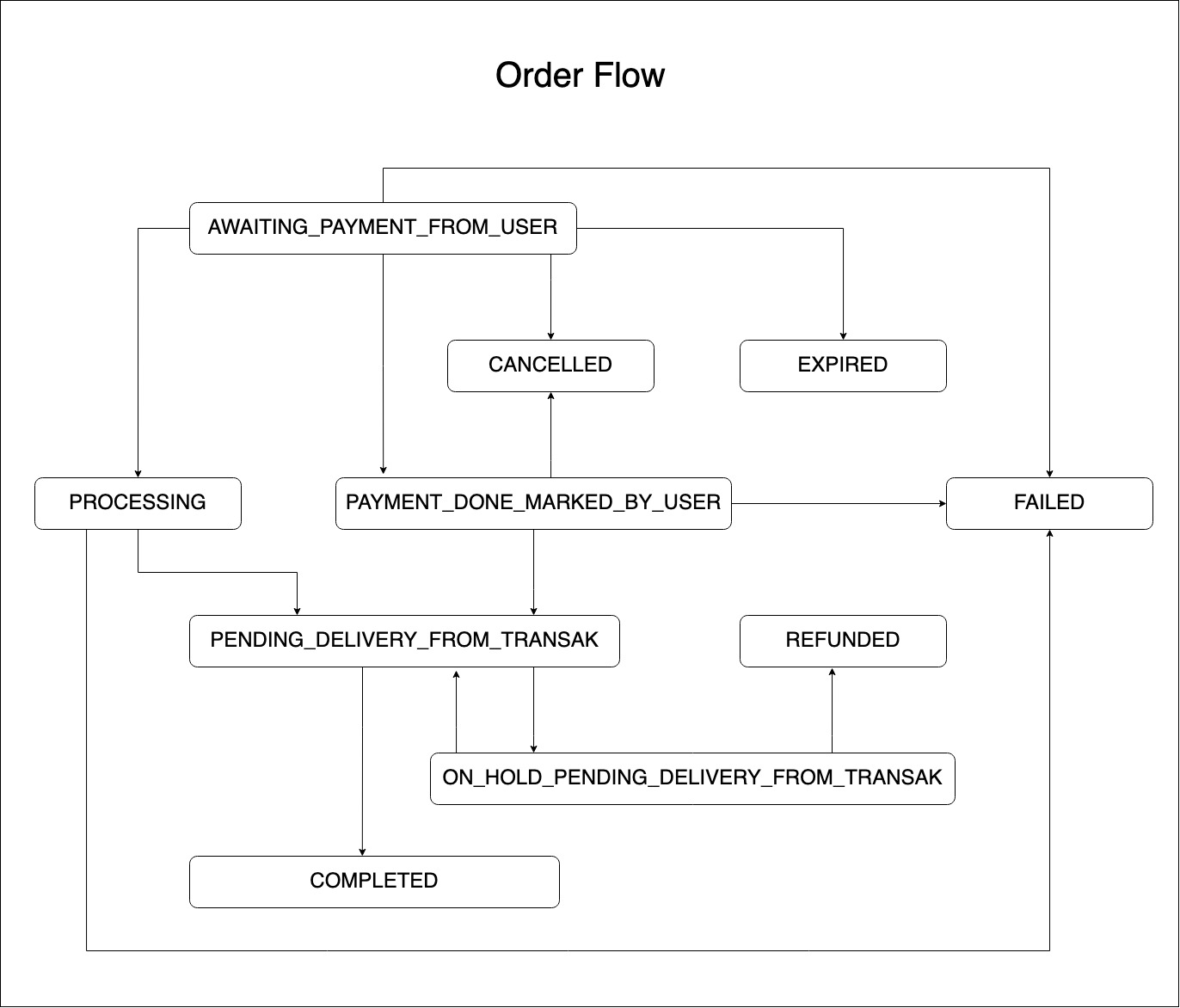 ## Order Status Reference
| Status Code | Description |
| --------------------------------------- | ------------------------------------------------------------------------------------------------------------ |
| `AWAITING_PAYMENT_FROM_USER` | When the order is created but the payment still not received. |
| `PAYMENT_DONE_MARKED_BY_USER` | When the user marks the payment as done but it is received by us yet. |
| `PROCESSING` | Orders in the PROCESSING state have passed the checks and the user's payment information has been validated. |
| `PENDING_DELIVERY_FROM_TRANSAK` | When the payment is received and being exchanged & transferred via us or our liquidity partner. |
| `ON_HOLD_PENDING_DELIVERY_FROM_TRANSAK` | Order is on hold. |
| `COMPLETED` | When we have received the payment and the crypto is sent successfully to the user. |
| `CANCELLED` | Order is cancelled. |
| `FAILED` | When the order is failed, e.g.: because of the card decline. |
| `REFUNDED` | Order is refunded to the user. |
| `EXPIRED` | When the user failed to make the payment within the timeframe. |
| Status Code | Description |
| --------------------------------------- | ------------------------------------------------------------------------------------------------------------------------------------------------------------------------------------- |
| `AWAITING_PAYMENT_FROM_USER` | When the order is created but the payment still not received. |
| `PAYMENT_DONE_MARKED_BY_USER` | When the user marks the payment as done but it is not yet received by us. |
| `PENDING_DELIVERY_FROM_TRANSAK` | When the payment is received and being exchanged & transferred via us or our liquidity partner. |
| `ON_HOLD_PENDING_DELIVERY_FROM_TRANSAK` | When the crypto payment is received and being exchanged & fiat being transferred via our banking partner but because of some issue our system is unable to send the fiat to the user. |
| `COMPLETED` | When we have received the crypto payment and fiat is sent successfully to the user's bank account. |
| `CANCELLED` | Order is cancelled. |
| `FAILED` | When the order is failed, e.g.: because of the card decline. |
| `REFUNDED` | Order is refunded to the user. |
| `EXPIRED` | When the user failed to make the payment within the timeframe. |
## Use Cases
Check if the user has already onboarded with Transak. If so, remind them they don't need to complete KYC again.
Check if the user has a pending order and direct them to complete it rather than starting a new one.
If an order fails, direct the user to retry with a different payment method or card.
Use Transak's user status signals (e.g. disabled user) as an input into your own risk management decisions.
## Order Status Reference
| Status Code | Description |
| --------------------------------------- | ------------------------------------------------------------------------------------------------------------ |
| `AWAITING_PAYMENT_FROM_USER` | When the order is created but the payment still not received. |
| `PAYMENT_DONE_MARKED_BY_USER` | When the user marks the payment as done but it is received by us yet. |
| `PROCESSING` | Orders in the PROCESSING state have passed the checks and the user's payment information has been validated. |
| `PENDING_DELIVERY_FROM_TRANSAK` | When the payment is received and being exchanged & transferred via us or our liquidity partner. |
| `ON_HOLD_PENDING_DELIVERY_FROM_TRANSAK` | Order is on hold. |
| `COMPLETED` | When we have received the payment and the crypto is sent successfully to the user. |
| `CANCELLED` | Order is cancelled. |
| `FAILED` | When the order is failed, e.g.: because of the card decline. |
| `REFUNDED` | Order is refunded to the user. |
| `EXPIRED` | When the user failed to make the payment within the timeframe. |
| Status Code | Description |
| --------------------------------------- | ------------------------------------------------------------------------------------------------------------------------------------------------------------------------------------- |
| `AWAITING_PAYMENT_FROM_USER` | When the order is created but the payment still not received. |
| `PAYMENT_DONE_MARKED_BY_USER` | When the user marks the payment as done but it is not yet received by us. |
| `PENDING_DELIVERY_FROM_TRANSAK` | When the payment is received and being exchanged & transferred via us or our liquidity partner. |
| `ON_HOLD_PENDING_DELIVERY_FROM_TRANSAK` | When the crypto payment is received and being exchanged & fiat being transferred via our banking partner but because of some issue our system is unable to send the fiat to the user. |
| `COMPLETED` | When we have received the crypto payment and fiat is sent successfully to the user's bank account. |
| `CANCELLED` | Order is cancelled. |
| `FAILED` | When the order is failed, e.g.: because of the card decline. |
| `REFUNDED` | Order is refunded to the user. |
| `EXPIRED` | When the user failed to make the payment within the timeframe. |
## Use Cases
Check if the user has already onboarded with Transak. If so, remind them they don't need to complete KYC again.
Check if the user has a pending order and direct them to complete it rather than starting a new one.
If an order fails, direct the user to retry with a different payment method or card.
Use Transak's user status signals (e.g. disabled user) as an input into your own risk management decisions.