For AI agents: a documentation index is available at the root level at /llms.txt and /llms-full.txt. Append /llms.txt to any URL for a page-level index, or .md for the markdown version of any page.
Dashboard
DocsAPI Reference
DocsAPI Reference
    • What is Transak
  • Features
    • Auth Reliance
    • KYC Reliance using Sumsub
    • Webhooks
    • WebSockets
  • Products Overview
    • On Ramp
    • Off Ramp
    • NFT Checkout
    • Transak Stream - On Ramp
  • Integration Options
    • API
  • Customization Options
    • Query Parameters
    • Customizing theme using query parameters
  • Guides
    • How To Create a Partner Dashboard Account
    • How to Add Partner Fees and Set Up Partner Payouts
    • How to Test using Sandbox Credentials
    • How to Test ACH Pull Transaction in Sandbox
    • How to Test Apple Pay in Sandbox
    • How to Track Order Status
    • Transak Different KYC Levels
    • How to Submit FCA Requirements
    • How to Use Advanced Query Params
    • How to Create a Widget URL with Parameters and Test Different Scenarios
    • How to Generate Calldata for NFT Checkout
    • How to Add NFT Smart Contract in the Dashboard and Create a contractId
    • Get Price based on User Region
    • How to Create Partner Access Token
    • How to Decrypt the Webhook Payload
    • How to add MCP Server for Transak Documentation
    • Widget with API Customization
    • Integration Update - Mandatory Migration to API based Transak Widget URL
    • Biconomy: Simplified Onboarding Using MEE-Compatible Smart Accounts
    • Partner FAQs
    • Need Help?
Dashboard
LogoLogo
On this page
  • Overview
  • Key Characteristics & Features
  • How the flow works
  • What are the use cases?
  • How to integrate?
  • Integration Options
  • Supported Fiat Currencies
  • API Overview
Products Overview

Transak Stream - On Ramp

Turn fiat into crypto automatically with virtual bank accounts
||View as Markdown|
Was this page helpful?
Edit this page
Previous

NFT Checkout

Next

Whitelabel API

Built with

Overview

Transak Stream – On-Ramp makes it easy to turn fiat money into crypto automatically. When funds are sent to a virtual bank account, Transak converts them into crypto and delivers the assets directly to a predefined wallet—no user action needed at the time.

Transak handles everything behind the scenes: providing local virtual bank accounts, tracking incoming payments, converting funds to crypto, and offering simple APIs so partners can easily manage transactions and reconciliation.

Ideal for — Payroll platforms, fintech companies, and wallets that want a seamless fiat in → crypto out experience running in the background, instead of a one-time checkout flow.

Key Characteristics & Features

Virtual bank accounts per user

Create named VBAs in supported fiat currencies (EUR, GBP, USD, INR, etc). Each VBA is linked to a specific wallet address, crypto asset, and network to define how incoming fiat should be converted.

Automatic on-ramp order creation

When fiat is received into a VBA, Transak automatically creates an on-ramp order, generates a quote, reserves the wallet, and dispatches crypto to the configured wallet.

Risk, compliance, and limits

Standard KYC is required for end users. Stream On-Ramp is explicitly scoped to bank transfers and excludes direct B2C app flows.

How the flow works

1

User and partner setup

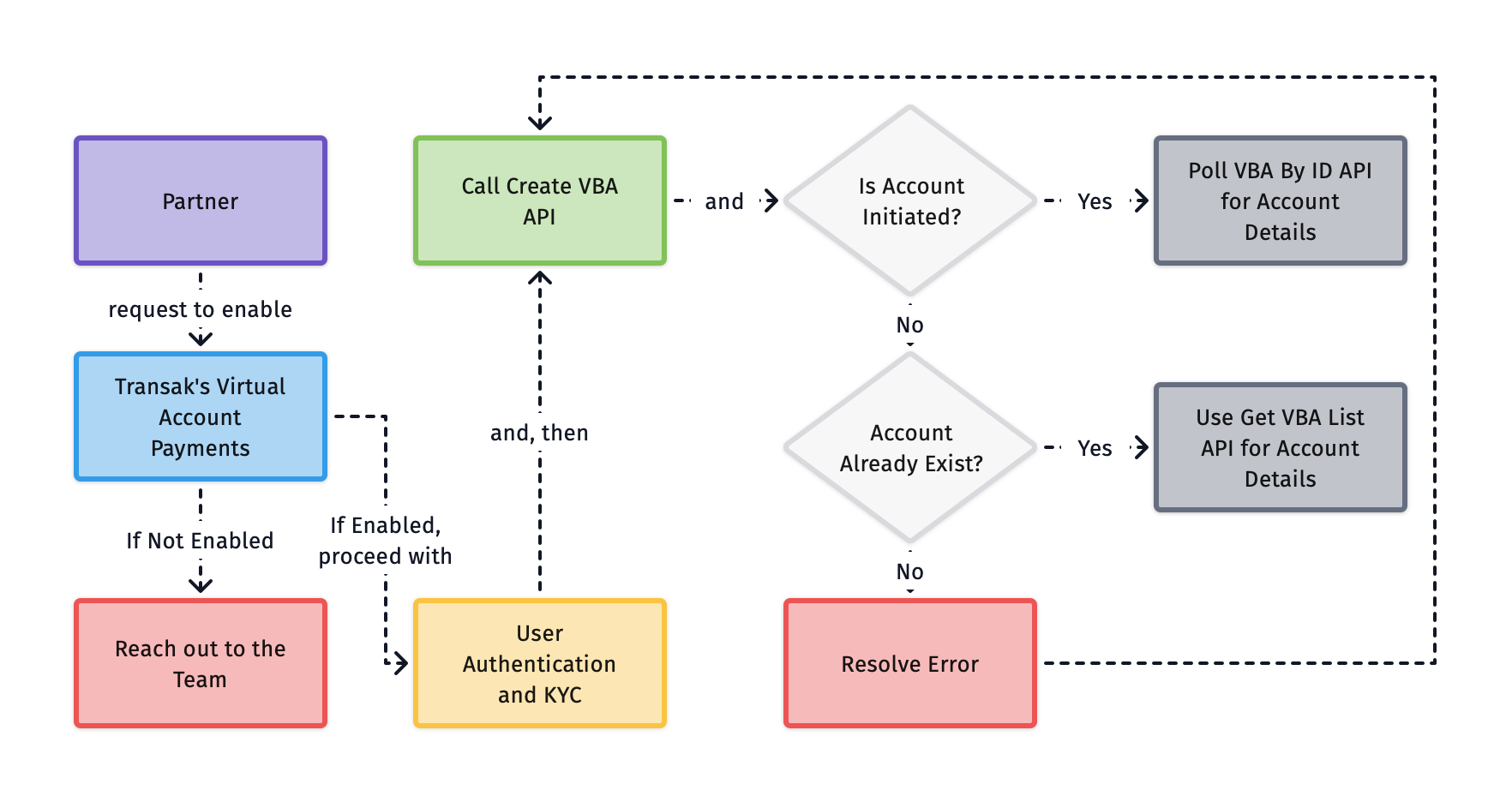
The partner ensures the user is authenticated and verified. This includes user authentication and completion of required KYC checks, either directly through Transak or via supported reliance mechanisms.

2

Create a virtual bank account

Partner can create a Virtual Bank Account (VBA) that is assigned to the user and mapped to a predefined crypto destination, including the wallet address, asset, and network.

3

Partner/User sends fiat to the VBA

The Partner/User needs to send fiat to the assigned Virtual bank account using a standard bank transfer method supported in their region (SEPA, Faster Payments, ACH, wire, IMPS, etc).

4

User receives crypto in wallet address

Once the payment is received and confirmed, Transak automatically converts the fiat amount into the configured crypto asset and sends it to the mapped wallet address.

What are the use cases?

1

Payroll to stablecoin

The user or partner provider wants payouts in stablecoins, but the entity and provider do not want to touch crypto or overhaul payroll systems.

Configure payout

User configures a crypto payout method (token, chain, wallet) once in the partner UI.

Create VBA

Transak creates an employee-named VBA in local contract currency (EUR, GBP, USD, INR, etc) via Stream On-Ramp.

Send salary

User sends salary to that VBA as usual. Transak auto-converts the configured portion to stablecoin (e.g., USDC on Base) and sends it on-chain to the user’s wallet address created through Transak.

Track orders

Partner receives webhooks with status, tx hash, and reporting fields for order tracking.

2

Recurring deposit-to-crypto for wallets/exchanges / DApps

Streamed deposits

Wallets or exchanges can offer “streamed deposits” where users receive regular bank transfers into a VBA.

Automatic accumulation

Crypto automatically accumulates in the user’s self-custodial or exchange wallet without having to initiate each purchase.

How to integrate?

1

Whitelist Your API Key & Enable Stream On-Ramp

Action
Follow the steps in the Need help in Integration section
Request API key whitelisting and ask to enable Transak Stream – On-Ramp for your API key
Share your public IP addresses with Transak for whitelisting to use our APIs in your backend
2

User Authentication

You can use either of the following authentication options:

OptionDescription
White-label AuthUse the standard Transak authentication flow to generate a user access token. Partners can do this by calling the Send User OTP API followed by the Verify User API to generate the access token.

Learn more
Auth RelianceUse Auth Reliance by passing these headers with every request: x-user-identifier and x-access-token

Please refer to the tutorial on how to create partner access token.

3

User KYC

KYC is a mandatory step in compliance with regulatory requirements. Each user should be Standard KYC Approved before the creation of Virtual Bank Account. You can use either of the following KYC options:

OptionDescription
White label KYCPartners can collect the required KYC information on their end and then forward it to Transak for review and approval. Learn more: Whitelabel KYC
KYC Reliance via SumsubPartners can share their KYC data from their platform with Transak using Sumsub. Learn more: KYC Reliance Guide
4

Create a Virtual Bank Account (VBA)

Call the Create VBA API to generate a virtual bank account that is linked to a crypto wallet.

5

Send Fiat Funds to the VBA

Use the virtual bank account details to send fiat payments. Incoming funds are automatically converted to crypto and sent to the linked wallet.

Integration Options

Transak Stream – On-Ramp is an API-only product. Integrate via our backend APIs:

Whitelabel API

Integrate our APIs in your backend to build a fully custom UI and user journey.

Supported Fiat Currencies

Virtual bank accounts can only be created for the following fiat currencies and supported payment methods:

Fiat CurrencyPayment Methods
EURSEPA/SEPA Instant Bank Transfers
GBPFaster Payments
INRIMPS, NEFT, RTGS
USDWire, ACH (Coming Soon)

API Overview

Create VBA

Creates a Virtual bank account that auto-converts fiat to crypto and sends to the predefined wallet address.

Get VBA List

Lists all virtual bank accounts of a user created under your partner account, along with their status and configuration details.

Get VBA by ID

Retrieves the complete details of a specific virtual bank account, including its fiat setup, crypto destination, and current status.

Update VBA

Updates the configuration of an existing virtual bank account, including the linked wallet address, crypto asset, network, and related payout details.

Delete VBA

Delete an existing virtual bank account, preventing it from receiving any further incoming fiat transfers.

Add Remitter Account

Adds an approved source bank account for transactions (Only applicable for INR fiat currency).

Update Remitter Account

Updates an approved source bank account for transactions when sender account details need to be changed (Only applicable for INR fiat currency).

Transak Stream - On-Ramp APIs are to be called only from the partner backend and subjected to the whitelisting of partner IP addresses. Direct API calls from the frontend apps are not supported.