
For AI agents: a documentation index is available at the root level at /llms.txt and /llms-full.txt. Append /llms.txt to any URL for a page-level index, or .md for the markdown version of any page.
Dashboard
DocsAPI Reference
DocsAPI Reference
    • What is Transak
  • Features
    • Auth Reliance
    • KYC Reliance using Sumsub
    • Webhooks
    • WebSockets
  • Products Overview
    • On Ramp
    • Off Ramp
    • NFT Checkout
  • Integration Options
    • API
  • Customization Options
    • Query Parameters
    • Customizing theme using query parameters
  • Guides
    • How To Create a Partner Dashboard Account
    • How to Add Partner Fees and Set Up Partner Payouts
    • How to Test using Sandbox Credentials
    • How to Test ACH Pull Transaction in Sandbox
    • How to Test Apple Pay in Sandbox
    • How to Track Order Status
    • Transak Different KYC Levels
    • How to Submit KYC FCA Requirements
    • How to Use Advanced Query Params
    • How to Create a Widget URL with Parameters and Test Different Scenarios
    • How to Generate Calldata for NFT Checkout
    • How to Add NFT Smart Contract in the Dashboard and Create a contractId
    • Get Price based on User Region
    • How to Create Partner Access Token
    • How to Decrypt the Webhook Payload
    • How to add MCP Server for Transak Documentation
    • Widget with API Customization
    • Integration Update - Mandatory Migration to API based Transak Widget URL
    • Biconomy: Simplified Onboarding Using MEE-Compatible Smart Accounts
    • Partner FAQs
    • Need Help?
Dashboard
LogoLogo
On this page
  • Why is it required?
  • How it works?
  • Different FCA Status
  • When to integrate?
  • How to Integrate?
Guides

How to Submit FCA Requirements (For UK Users only)

Step-by-step guide to completing FCA compliance for UK users in the KYC flow.

||View as Markdown|
Was this page helpful?
Edit this page
Previous

Transak Different KYC Levels

Next

How to Use Advanced Query Parameters

Built with

FCA (Financial Conduct Authority) compliance is required for all UK users before they can complete a crypto purchase.

Why is it required?

UK’s Financial Conduct Authority extended its Financial Promotions regime to cryptoassets under the Financial Services and Markets Act 2000 (Financial Promotion) (Amendment) Order 2023. This means any business communicating or approving crypto-related promotions to UK retail consumers must comply with strict FCA rules regardless of where that business is based.

The regulation introduces three mandatory requirements before a UK user can complete a crypto purchase:

Investor Categorization

Users must be classified as a High Net Worth Investor or Self-Certified Sophisticated Investor. Retail consumers who do not meet either threshold are restricted from purchasing high-risk investments.

Risk Disclosure Agreement

Users must read and acknowledge a compliance agreement that clearly sets out the risks of investing in cryptoassets, including the possibility of losing their entire investment.

Appropriateness Assessment

Users must pass a short knowledge quiz to demonstrate they understand the risks before they are permitted to proceed. The FCA also mandates a 24-hour cooling-off period for first-time investors before they can place an order.

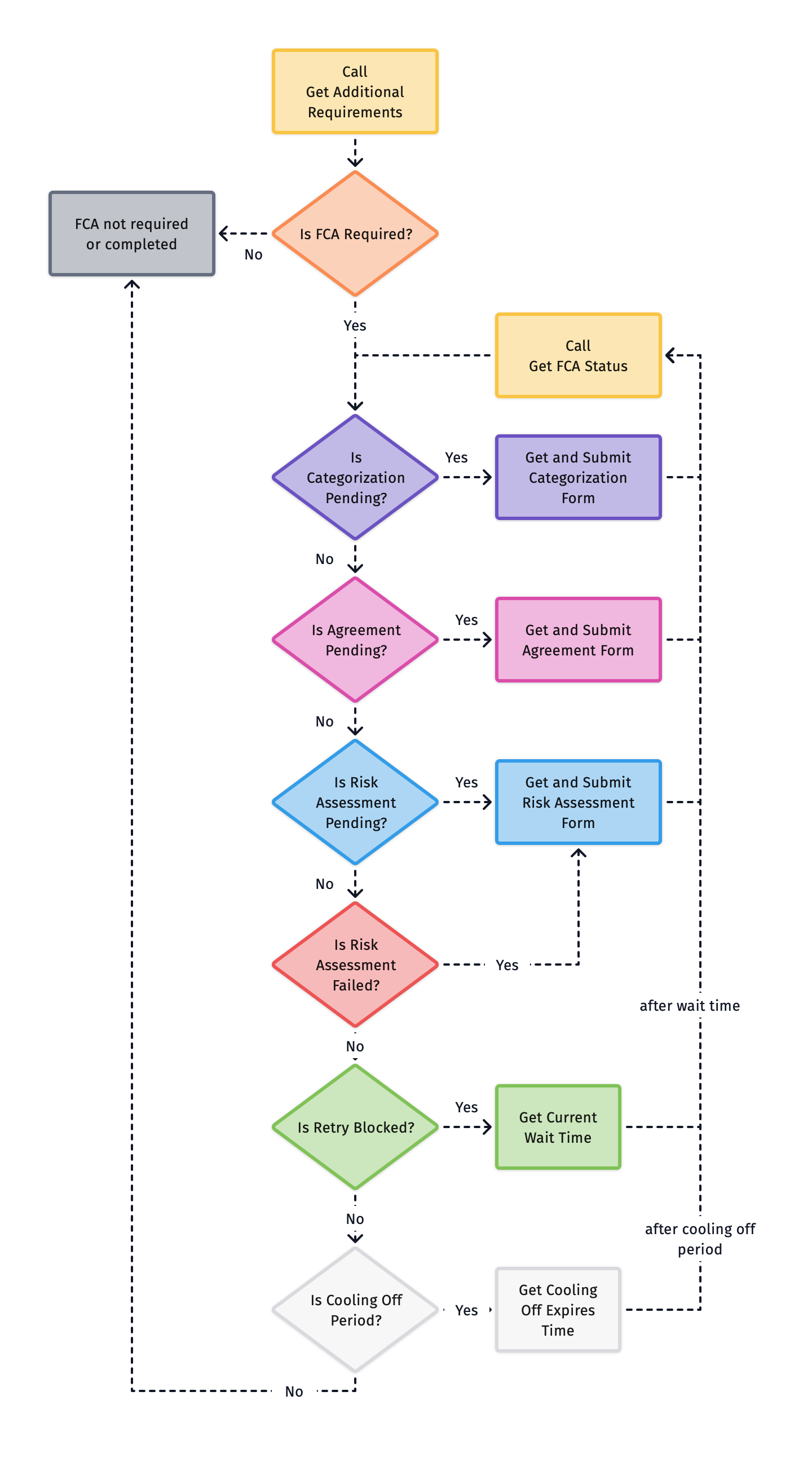
How it works?

FCA

Different FCA Status

StatusMeaning
CATEGORIZATION_PENDINGThe user has not yet completed investor categorization. Render and submit the categorization quiz.
AGREEMENT_PENDINGCategorization passed. The user must now read and sign the compliance agreement.
RISK_ASSESSMENT_PENDINGAgreement accepted. The user must complete the risk knowledge quiz before proceeding.
RISK_ASSESSMENT_FAILEDThe user failed the risk assessment. They can retry as long as the maximum number of attempts has not been reached.
BLOCKED_RETRYThe user has exceeded the maximum number of retry attempts. No submission is allowed until the 24-hour wait period expires.
COOLING_PERIODThe user has passed all steps. A mandatory FCA cooling-off period is now active before the first order can be placed.

When to integrate?

If a user requires FCA compliance, Get Additional Requirements API will include "type": "FCA" in the response alongside any other pending KYC requirements. The status in response indicates the next pending FCA step awaiting completion.

1{
2 "data": {
3 "formsRequired": [
4 {
5 "type": "FCA",
6 "metadata": {
7 "status": "AGREEMENT_PENDING"
8 }
9 }
10 ]
11 }
12}

How to Integrate?

1

Check if FCA is Required

Call Get Additional Requirements API with the quoteId. If the response includes a form entry with type: FCA, the user must complete the FCA flow.

1{
2 "data": {
3 "formsRequired": [
4 {
5 "type": "FCA",
6 "metadata": {
7 "status": "CATEGORIZATION_PENDING"
8 }
9 }
10 ]
11 }
12}
2

Fetch the Current FCA Step Data

Call Get FCA Requirements API with the current status to fetch the FCA requirements of the step.

3

Present the Step to the User and Collect Input

Using the data returned from the previous step, render the appropriate UI for the current FCA status.

StatusWhat to show
CATEGORIZATION_PENDINGRender the investor categorization quiz and collect answers
AGREEMENT_PENDINGDisplay the compliance agreement and collect the user’s signature
RISK_ASSESSMENT_PENDINGRender the risk knowledge quiz and collect answers
RISK_ASSESSMENT_FAILEDInform the user they failed and present the quiz again for retry
BLOCKED_RETRYShow a waiting screen with the canRetryAfter timestamp
COOLING_PERIODInform the user that FCA is complete and they are in a mandatory cooling-off period
4

Submit the Current FCA Step Data

Call Post FCA Requirements API with the user’s input for the current status.

5

Get the Updated FCA Status

After every successful submission, call Get FCA Status API to retrieve the updated status.

StatusAction
COMPLETEDFCA flow is complete
Any other statusGo back to Step 2 with the new status and continue