

Transak KYC using APIs
This document provides a detailed explanation of KYC flows, covering Simple KYC, Standard KYC and Enhanced KYC, along with the required API interactions and processes. KYC is a mandatory step in compliance with regulatory requirements before users can place orders on Transak.
KYC Flow Chart
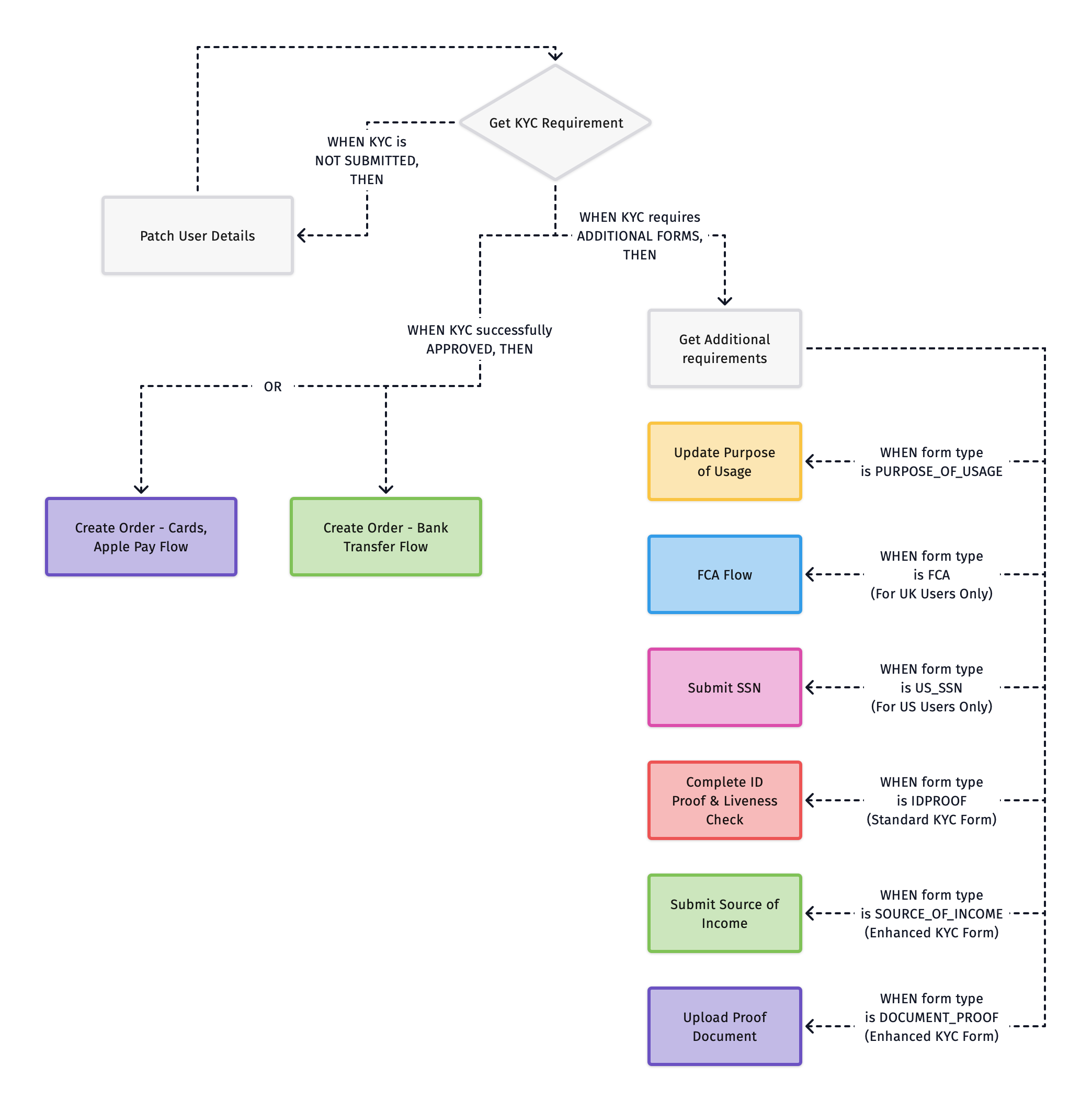
Fetch KYC Requirement Based on Quote ID
The KYC requirements are determined dynamically using the quote ID. Transak supports multi-level KYC, meaning different users may have different requirements based on country, regulations, and transaction limits.
When fetching KYC Requirement, there can be four statuses:
- Personal Details → First name, last name, mobile number, and date of birth.
- Address Details → User’s residential details (address, city, state, zip code).
- Purpose of Usage → Used for compliance with regulations.
- ID Proof → Required only if Standard or Enhanced KYC is needed.
- SSN → Required only for US KYC users.
- FCA → Required only for UK KYC users.
- MiCA Consent → Required only for existing EEA KYC users who completed KYC before MiCA.
- Source of Income → Required if Enhanced KYC is needed, and for all EEA KYC users (with employment status and nationality).
- Proof Document → Required only if Enhanced KYC is needed.
All forms must be submitted in the sequence provided in the Get Additional Requirements API.
KYC Flow - Step-by-Step Guide
Fetch KYC Status
Call Get KYC Requirement with the quoteId to fetch current status of the user’s KYC.
EEA users: a user who was APPROVED before MiCA can return ADDITIONAL_FORMS_REQUIRED or NOT_SUBMITTED until they complete the MiCA steps or a KYC refresh. Do not cache the KYC status. Call this step with a fresh quoteId before every order.
Patch User Details
Call Patch User Details to collect and submit the user’s personal and address information.
Once submitted, return to Step 1 to re-fetch the updated KYC status.
Get Additional Requirements
Call Get Additional Requirements to check which forms still need to be completed.
Check if additional information must be provided for KYC Approval. Multiple forms may appear and must be submitted in the sequence provided in the API response:
- If
type = PURPOSE_OF_USAGE→ Follow Step 4 - If
type = IDPROOF→ Follow Step 5 - If
type = US_SSN→ Follow Step 6 - If
type = FCA→ Follow Step 7 - If
type = CONSENT→ Follow Step 8 - If
type = SOURCE_OF_INCOME→ Follow Step 9 - If
type = DOCUMENT_PROOF→ Follow Step 10
MiCA forms for EEA users
1. CONSENT is usually returned first. Existing EEA users get the CONSENT form. Process forms in the order they are returned. New EEA users, who complete KYC after MiCA, never get CONSENT: their first forms are the usual ones, such as PURPOSE_OF_USAGE.
After the consent is submitted in Step 8, call Get Additional Requirements again to get the next forms. Do this after each form you submit: more forms (for example IDPROOF) can appear until Get KYC Requirement returns APPROVED.
2. SOURCE_OF_INCOME has extra options for EEA users. Besides the source of funds options, metadata includes employmentStatusOptions and countryOfCitizenshipOptions. Build a dropdown from each list and send the selected value in Step 9.
Transak decides whether a new user is an EEA user from the address country sent in Step 2 (Patch User Details), not from the fiat currency. Until an EEA address is submitted, the SOURCE_OF_INCOME form and its EEA options are not returned, so call Get Additional Requirements again after Step 2.
EEA users submit employmentStatus and countryOfCitizenship on the SOURCE_OF_INCOME form, together with the source of funds. They do not get a separate form for these fields.
3. ID proof may be requested again. If the user’s ID document has expired or their KYC is older than 12 months, IDPROOF can be returned. Handle it as in Step 5.
Complete ID Proof & Liveness Check (For Standard KYC)
Redirect the user to the Transak-hosted KYC Widget using the kycUrl returned in the Additional Requirements response.
Submit SSN (US Users Only)
Call Submit SSN to validate the user’s identity using their Social Security Number.
Submit FCA (UK Users Only)
FCA (Financial Conduct Authority) compliance is required for all UK users. The flow covers three sequential steps — investor categorization, a compliance agreement, and a risk assessment.
See the dedicated guide for the full API sequence, status handling, and step-by-step integration details:
Submit MiCA Consent (EEA Users Only)
EEA users who completed KYC before MiCA must give a one-time MiCA consent. Show the consent screen, then call Submit MiCA Consent with the time the user agreed.
Submit Source of Income (For Enhanced KYC and EEA Users)
Call Submit Source of Income to capture the user’s primary income source. Required for higher transaction limits, and for all EEA users. EEA users must also send employmentStatus and countryOfCitizenship.
Upload Proof Document (For Enhanced KYC)
Call Upload Proof Document to submit supporting documentation for the income source selected in the previous step.
Different KYC Levels Guide
API Overview
See Error Codes for the KYC errors (30xx) these APIs return.