
How to Display Disclaimers in Your API Integration
Overview
Regulators in the US, the EEA and the UK require users to see certain notices before they buy or sell crypto. If you build your own checkout with the White-label API, you must show them in your UI.
Every Get Quote API response includes a termsIds array that lists the disclaimers for that quote. For each ID, show the text from this guide on the screen listed in Terms IDs.
Transak decides which IDs to return for each quote based on:
- User’s KYC country: the disclaimers depend on the country from the user’s KYC. If you call Get Quote without user authentication headers,
termsIdsis always empty. - Order type: for EEA users, buy quotes return
MICA_EEA_BUYand sell quotes returnMICA_EEA_SELL. - Order history (Transak and Coinme): on the user’s first order with the provider, the quote returns its full terms (
TRANSAK_TERMS_OF_SERVICEorCOINME_USER_AGREEMENT). On later orders, it returns a shorter confirmation,US_TERMS_RETURNING. Transak keeps track of this, so you only need to show whattermsIdsreturns. - Zero Hash orders:
ZEROHASH_USER_AGREEMENThas no shorter version. The quote returns it on every order, so always show the full agreement.
The fiat currency of the quote does not decide which disclaimers are returned. An EEA user paying in USD still gets MICA_EEA_BUY, and a EUR quote for a user outside the EEA gets no MiCA disclaimer.
Always show what termsIds returns: Show exactly the disclaimers in termsIds. Do not choose disclaimers yourself from the user’s country, currency or payment method.
How it works?
Call the Get Quote API with the user's details
Call the Get Quote API with the headers for your authentication method:
What termsIds returns depends on whether the user is logged in:
Read the termsIds from the response
The response contains a termsIds array with the disclaimers that apply to this quote:
termsIds is always present, and is an empty array when nothing applies. The IDs can change when the user changes the crypto asset, network, payment method or amount, so read termsIds from every quote you fetch.
Show the disclaimer for each ID
For each ID in termsIds, show the matching disclaimer on the screen listed in Terms IDs.
- Show the full text. Do not shorten it, collapse it, or hide part of it behind a “See more” link.
- Keep all links clickable, and open them in a new tab.
- Use the button label listed for the disclaimer. The first-order texts say “By clicking “Agree and Confirm Order,””, so the button must read Agree and Confirm order. For Apple Pay and Google Pay, the text starts with “By clicking on the button below,” instead. See Apple Pay and Google Pay.
- If
termsIdscontains more than one ID, show every disclaimer, in the order returned. - Keep each disclaimer visible until the user places the order.
Required for go-live: Transak reviews your checkout before go-live. A checkout that does not show every disclaimer returned in termsIds will not be approved.
Terms IDs
These are the Terms IDs that the Get Quote API can return in termsIds.
US Disclaimers
Each US order is executed by Transak, Coinme or Zero Hash. Show whichever ID the quote returns; Transak tracks which users have agreed to which terms.
Apple Pay and Google Pay
These use their own payment button and have no order confirmation screen. For the Transak and Coinme first-order texts, use the Apple Pay, Google Pay tab in each disclaimer. The text starts with “By clicking on the button below,” and goes directly above the Apple Pay or Google Pay button. US_TERMS_RETURNING and ZEROHASH_USER_AGREEMENT are the same for every payment method.
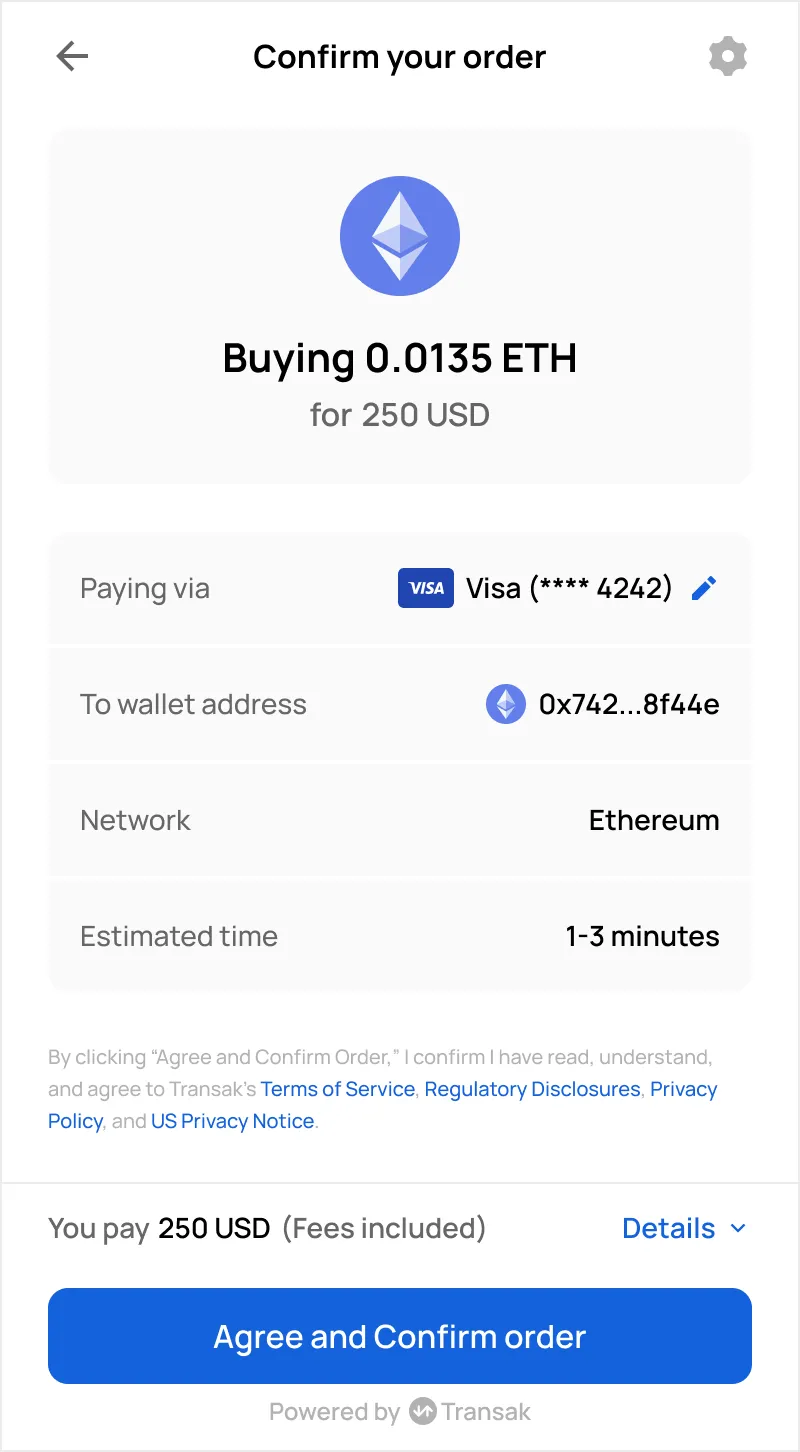
Transak Terms of Service
Returned as TRANSAK_TERMS_OF_SERVICE on the user’s first Transak order. Later orders return US_TERMS_RETURNING instead. The opening words depend on the payment method, so use the tab for the user’s payment method. Apple Pay and Google Pay have no order confirmation screen, so the text goes directly above the payment button.
Card, bank transfer
Apple Pay, Google Pay
By clicking “Agree and Confirm Order,” I confirm I have read, understand, and agree to Transak’s Terms of Service, Regulatory Disclosures, Privacy Policy, and US Privacy Notice.
The disclaimer goes on the order confirmation screen, above the button:
| Order confirmation screen |
|---|
 |
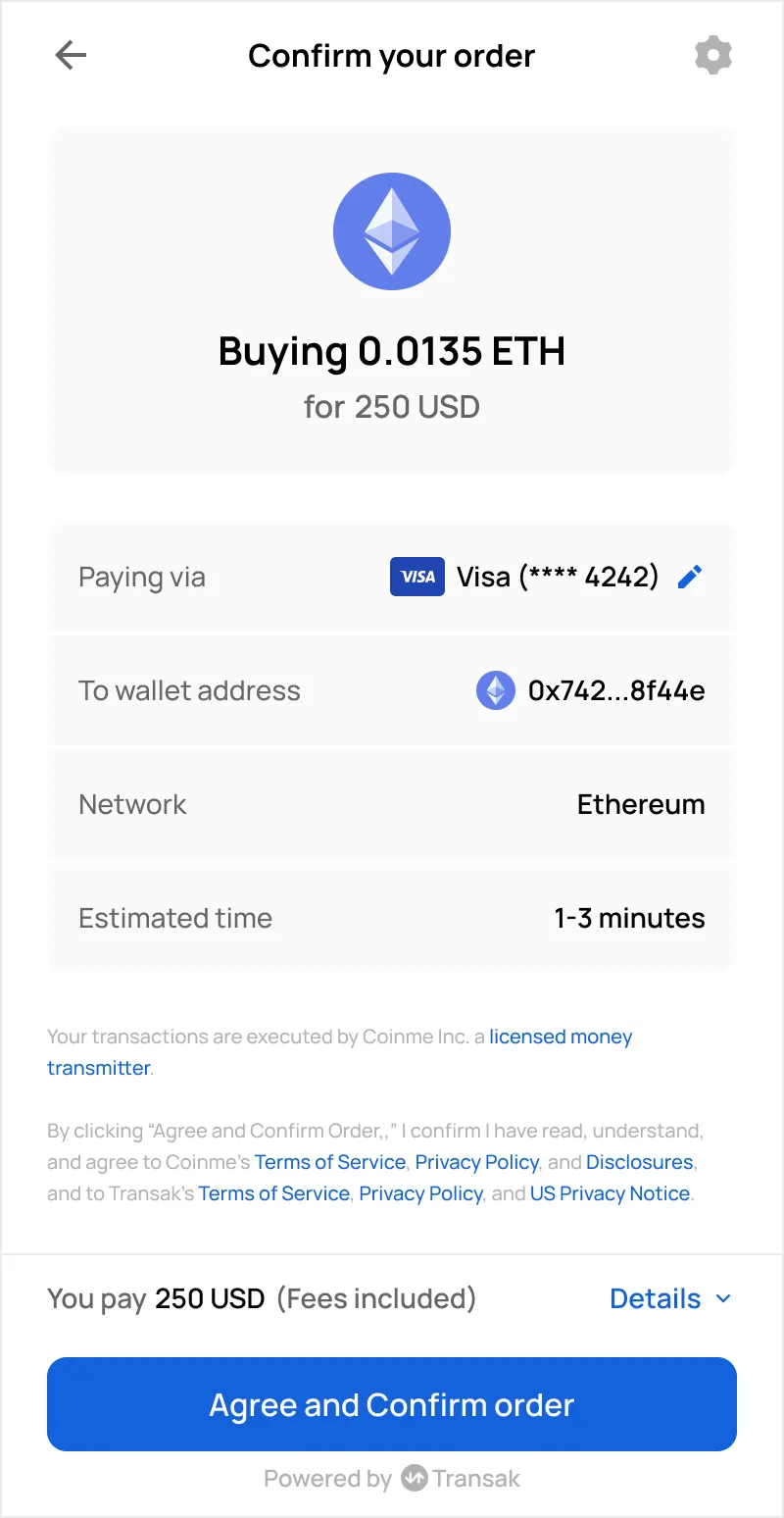
Coinme User Agreement
Returned as COINME_USER_AGREEMENT on the user’s first Coinme order. Later orders return US_TERMS_RETURNING instead. The opening words depend on the payment method, so use the tab for the user’s payment method. Apple Pay and Google Pay have no order confirmation screen, so the text goes directly above the payment button.
Card, bank transfer
Apple Pay, Google Pay
Your transactions are executed by Coinme Inc. a licensed money transmitter.
By clicking “Agree and Confirm Order,” I confirm I have read, understand, and agree to Coinme’s Terms of Service, Privacy Policy, and Disclosures, and to Transak’s Terms of Service, Privacy Policy, and US Privacy Notice.
The disclaimer goes on the order confirmation screen, above the button:
| Order confirmation screen |
|---|
 |
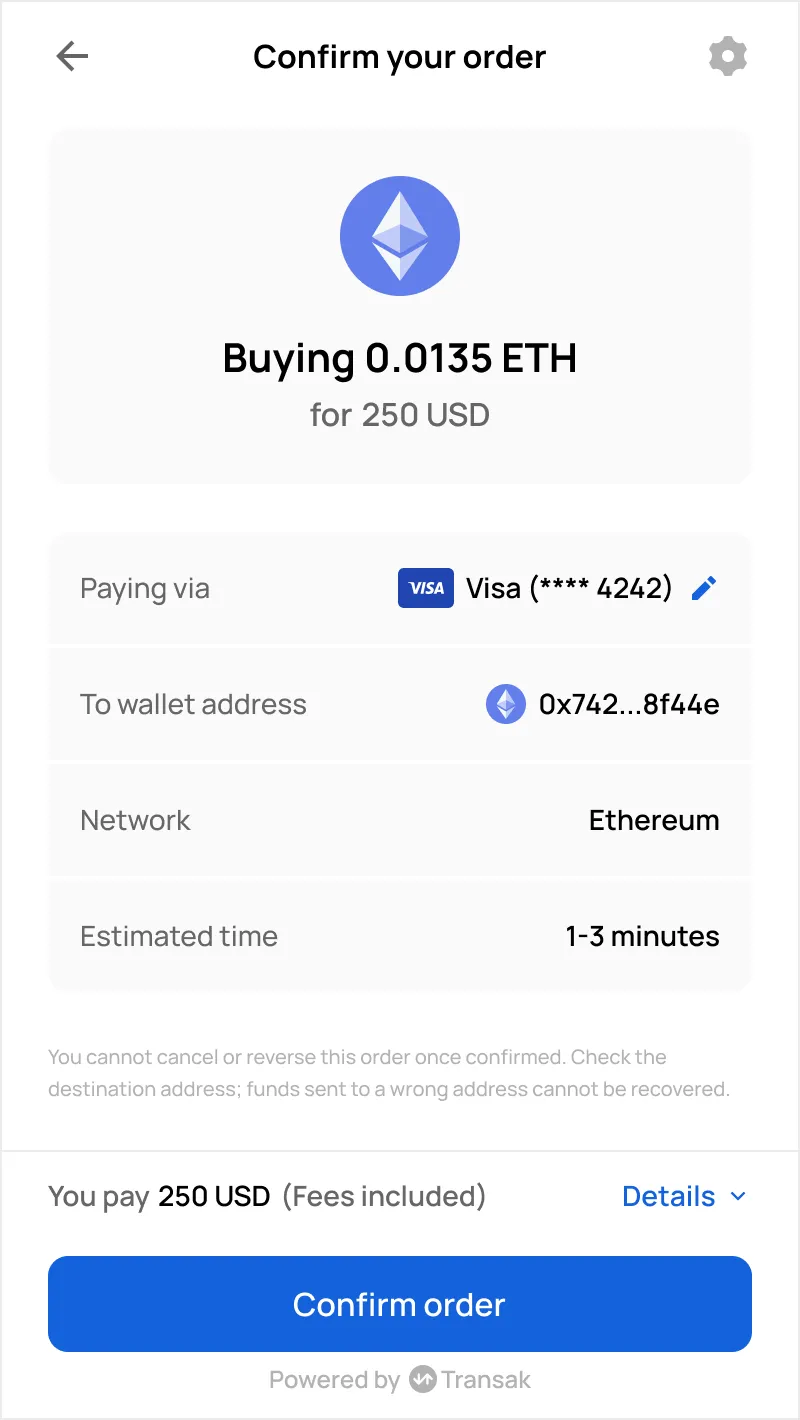
Returning US Users
Returned as US_TERMS_RETURNING on later Transak and Coinme orders, once the user has agreed to that provider’s terms. Show it with a Confirm order button. The text is the same for every payment method.
Preview
HTML
You cannot cancel or reverse this order once confirmed. Check the destination address; funds sent to a wrong address cannot be recovered.
The disclaimer goes on the order confirmation screen, above the button:
| Order confirmation screen |
|---|
 |
Zero Hash User Agreement
Returned as ZEROHASH_USER_AGREEMENT on every Zero Hash order. Show it with a Confirm order button. The text is the same for every payment method.
Preview
HTML
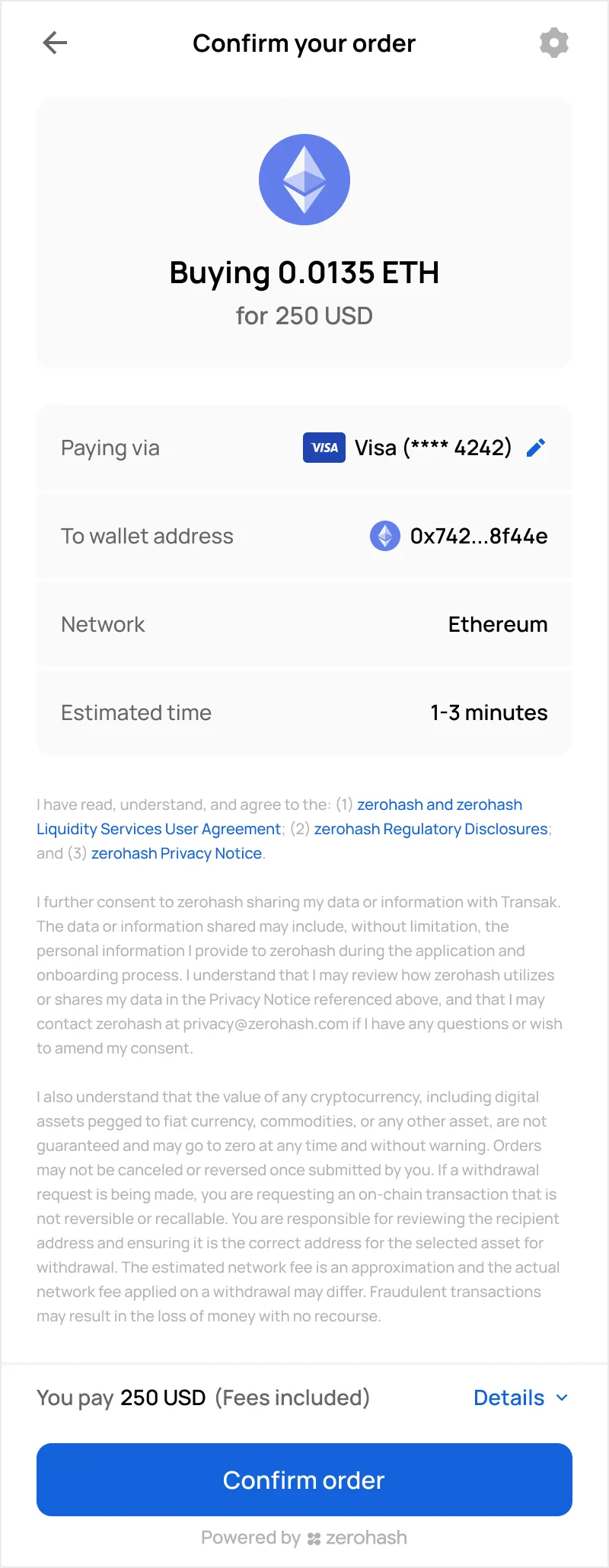
I have read, understand, and agree to the: (1) zerohash and zerohash Liquidity Services User Agreement; (2) zerohash Regulatory Disclosures; and (3) zerohash Privacy Notice.
I further consent to zerohash sharing my data or information with Transak. The data or information shared may include, without limitation, the personal information I provide to zerohash during the application and onboarding process. I understand that I may review how zerohash utilizes or shares my data in the Privacy Notice referenced above, and that I may contact zerohash at privacy@zerohash.com if I have any questions or wish to amend my consent.
I also understand that the value of any cryptocurrency, including digital assets pegged to fiat currency, commodities, or any other asset, are not guaranteed and may go to zero at any time and without warning. Orders may not be canceled or reversed once submitted by you. If a withdrawal request is being made, you are requesting an on-chain transaction that is not reversible or recallable. You are responsible for reviewing the recipient address and ensuring it is the correct address for the selected asset for withdrawal. The estimated network fee is an approximation and the actual network fee applied on a withdrawal may differ. Fraudulent transactions may result in the loss of money with no recourse.
The disclaimer goes on the order confirmation screen, above the button:
| Order confirmation screen |
|---|
 |
EEA Disclaimers (MiCA)
Show these on both the quote screen and the order confirmation screen, above the button, where the user sees them without scrolling. Do not place them inside their own scrolling area.
MiCA Buy Disclaimer
Returned as MICA_EEA_BUY.
Preview
HTML
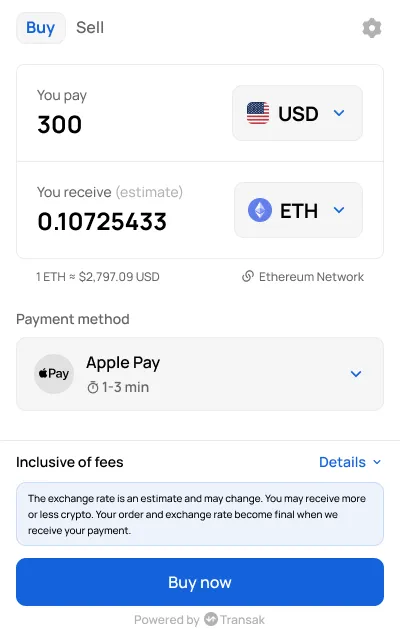
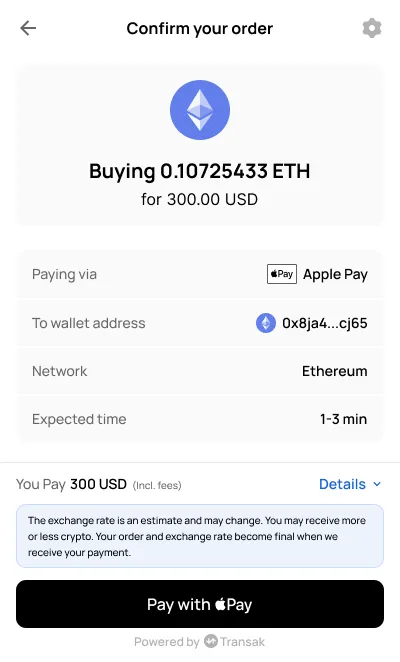
The exchange rate is an estimate and may change. You may receive more or less crypto. Your order and exchange rate become final when we receive your payment.
The disclaimer goes on the quote screen and the order confirmation screen, above the button:
| Quote screen | Order confirmation screen |
|---|---|
 |  |
MiCA Sell Disclaimer
Returned as MICA_EEA_SELL.
Preview
HTML
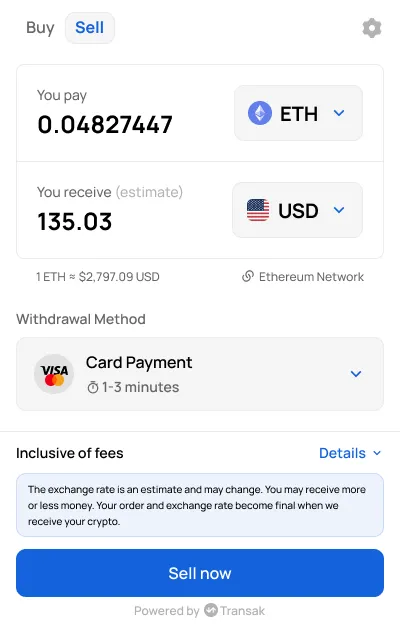
The exchange rate is an estimate and may change. You may receive more or less money. Your order and exchange rate become final when we receive your crypto.
The disclaimer goes on the quote screen and the order confirmation screen, above the button:
| Quote screen | Order confirmation screen |
|---|---|
 | 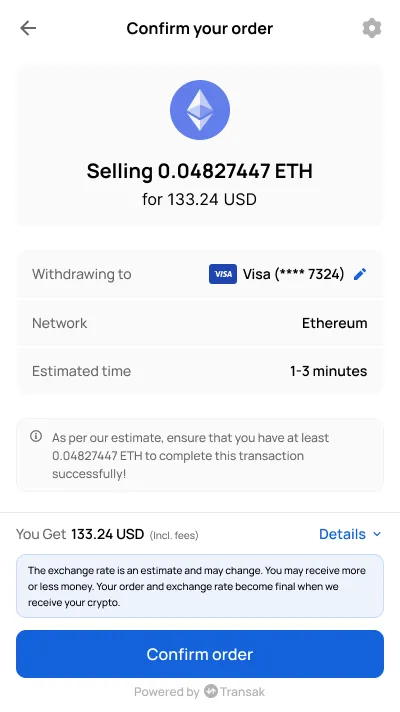 |
UK Disclaimer
UK Investment Risk Warning
Returned as GB_INVESTMENT_RISK_WARNING. Show it as a banner at the top of the quote screen and the order confirmation screen. The user does not need to accept it.
Preview
HTML
Don’t invest unless you’re prepared to lose all the money you invest. This is a high-risk investment and you should not expect to be protected if something goes wrong. Take 2 mins to learn more
The warning goes as a banner at the top of the quote screen and the order confirmation screen:
| Quote screen | Order confirmation screen |
|---|---|
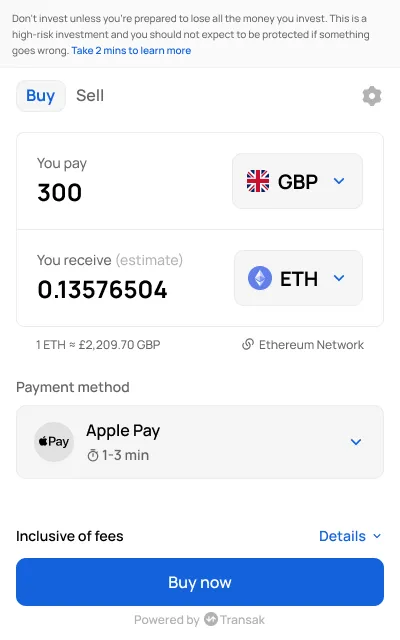 | 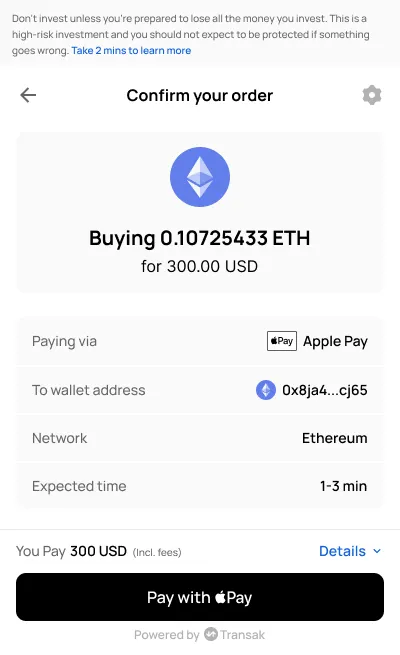 |