

Bank Transfer
With Bank Transfer, the user pays for the order from their own bank account. Transak sets up a virtual account for the user, the order returns the bank details to pay to, and your app confirms the payment once the user has made the transfer.
Supported bank transfer methods
Call Get Fiat Currencies to see which methods are available for the user’s fiat currency, with their limits and processing times.
Before you start
Complete these steps of the Whitelabel API flow first. New to the Whitelabel API? Start with the Quickstart.
Lookup
Get the supported countries, fiat currencies, cryptocurrencies, payment methods and a quote. See Lookup.
Authentication
Log the user in with Transak Auth or Partner Auth (Auth Reliance). See Authentication.
How to integrate?
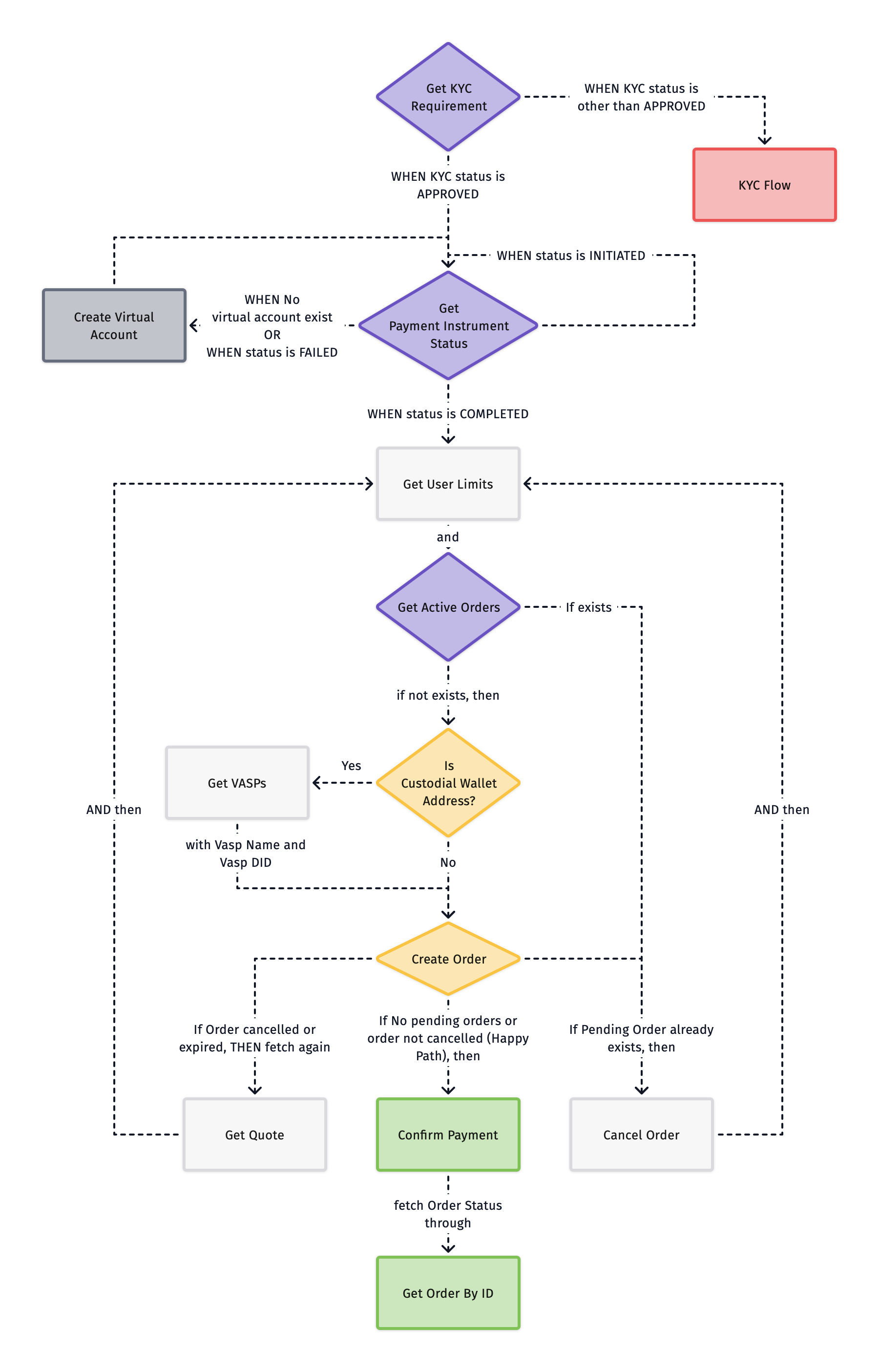
Get KYC Requirement
Call Get KYC Requirement with the quoteId to fetch the user’s KYC status and route accordingly:
Get Payment Instrument Status
Call Get Payment Instrument Status with the quoteId and paymentInstrumentId to check the user’s virtual account status:
Create Virtual Account
Call Create Virtual Account with the quoteId to initiate virtual account creation.
On success (status: INITIATED) → return to Get Payment Instrument Status and resume polling for status updates.
Get User Limits
Call Get User Limits with paymentCategory set to the user’s bank transfer method (for example sepa_bank_transfer or gbp_bank_transfer) and fiatCurrency to fetch the user’s monthly, daily, and yearly limits along with available limits to place an order.
On success → proceed to Get Active Orders.
Get Active Orders
Call Get Active Orders to check for any existing pending orders. Transak doesn’t support placing multiple orders simultaneously.
Get VASPs (For Custodial Wallet Address)
Call Get VASPs to get list of supported Virtual Asset Service Providers (VASPs) for custodial wallet address.
search param can be passed to search VASPs based on name.
Create Order
Call the Create Order API to place an order using a Custodial or Non Custodial wallet address.
US, EEA and UK users: before calling Create Order, show the disclaimers for the termsIds from the Get Quote response.
Mandatory Parameters
Required for Custodial wallet addresses for Travel Rule compliance:
addressAdditionalData
Confirm Payment
Call Confirm Payment with orderId and paymentMethod to confirm the bank transfer.
On success → proceed to Get Order By ID.
Cancel Order
Call Cancel Order with orderId and cancelReason to cancel a pending order.
This is only required when an active order is present. After cancellation, return to Get User Limits to start a fresh order.
API Overview
See Error Codes for the errors these APIs return.