Transak Stream - Off Ramp

Turn crypto into fiat automatically with dedicated wallets
View as Markdown

Transak Stream - Off Ramp makes it easy to turn crypto into fiat with a one-click experience. Users can receive fiat directly into their bank account or card by simply sending crypto, making the flow feel as seamless as transferring assets from one wallet to another.

Transak handles everything behind the scenes: wallet setup, payout method configuration, crypto-to-fiat conversion, and fiat settlement. Partners can embed Stream Off Ramp into their workflows and deliver smooth, intuitive payout experiences for their users.

Ideal for — Remittances, payroll systems, e-commerce payouts that want a seamless crypto in → fiat out experience running in the background, instead of a one-time checkout flow.

Key Characteristics & Features

Quick configuration

Configure your integration in minutes using a lightweight setup powered by query parameters.

Dedicated wallet Address

Each user gets a dedicated wallet address for easier management.

Fast settlement

Send crypto from any wallet to your user’s dedicated wallet address to Off-Ramp in under one minute.

Multiple payment methods

Supports SEPA, FPS, and card withdrawals.

Global coverage

Users can set a default crypto and network from the combinations currently supported with Off Ramp.

How the flow works

1

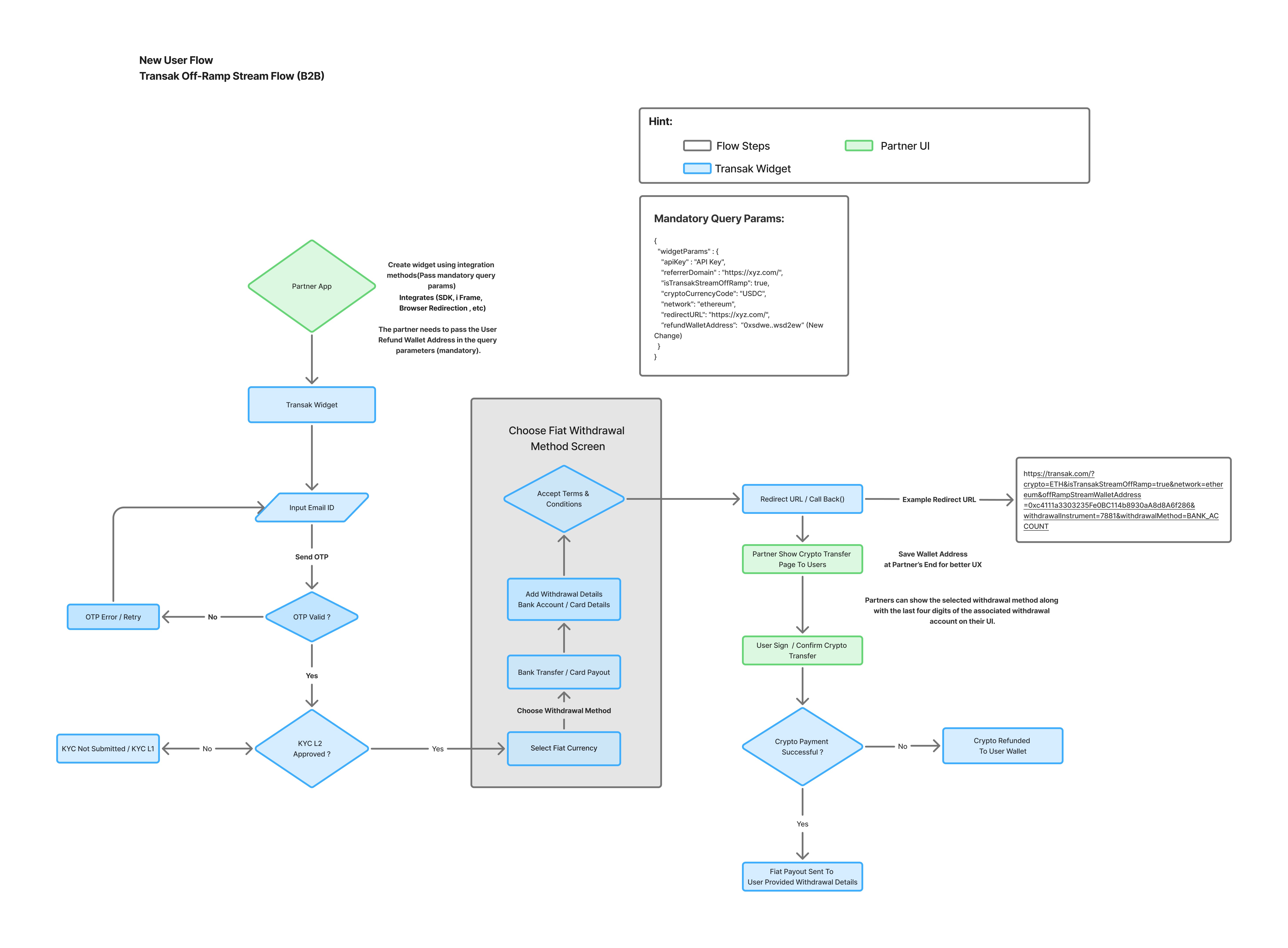
Partner launches Stream Off Ramp

Load the Transak widget in your preferred integration option with the required Stream Off Ramp parameters.

2

User completes one-time wallet setup

The user selects or confirms their payout method and Transak creates a dedicated wallet address for transfers.

3

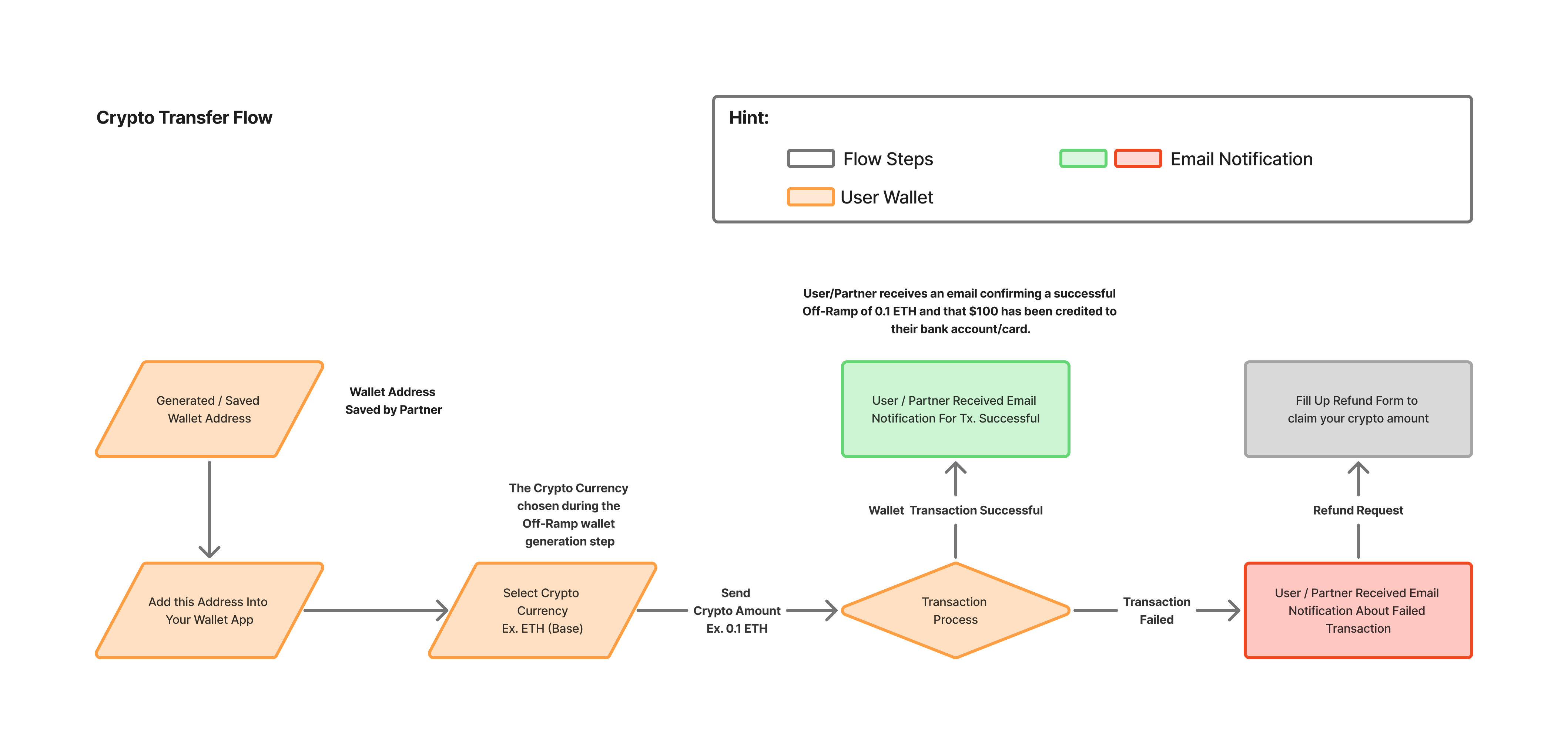
User sends crypto to the Dedicated wallet address

The user sends the supported crypto asset from any wallet to their assigned wallet address.

4

Transak converts and settles fiat

Once the crypto transfer is received, Transak processes the off-ramp and settles fiat to the configured payment method.

What are the use cases?

1

Remittances

Let users send supported crypto from any wallet while recipients receive fiat directly in their local bank account or card.

Simple send experience

Users only need to send crypto to a dedicated address instead of filling a sell form every time.

Direct fiat delivery

Funds are settled to the user’s selected bank account or card using Transak’s supported payout methods.

2

Payroll systems

Crypto-to-fiat salary payouts

Payroll platforms can let users receive compensation in fiat after sending supported crypto into their dedicated Stream wallet.

Repeatable payout setup

Once configured, recurring payout workflows become easier to manage for both employers and recipients.

How to integrate?

1

Enable Off-Ramp on your Transak account

Ensure your partner account has Off-Ramp enabled in the dashboard and that your integration has access to the supported payout methods.

3

Create widget URL with mandatory parameters (using Backend Only)

Use the Create Widget URL API to generate a widgetUrl and include the following mandatory Stream Off Ramp parameters inside widgetParams:

ParameterDescription
apiKeyYour Transak API key
referrerDomainAllowed domain for the widget
isTransakStreamOffRampEnables the Stream Off Ramp flow
cryptoCurrencyCodeDefault crypto asset for the Stream wallet
networkNetwork for the selected crypto
1"widgetParams": {
2 "apiKey": "YOUR_API_KEY",
3 "referrerDomain": "yourdomain.com",
4 "isTransakStreamOffRamp": true,
5 "cryptoCurrencyCode": "USDT",
6 "network": "ethereum"
7}
4

Handle the Stream callback data

When the wallet setup flow closes, capture the callback payload from the widget close event or redirection URL. This contains the dedicated wallet address and withdrawal information needed for the user.

The user then needs to send supported crypto to this wallet address to receive fiat as the payout in their selected bank account or card.

FieldDescription
cryptoCryptocurrency configured for the Stream flow
isTransakStreamOffRampBoolean-like flag identifying the Stream Off Ramp experience
networkNetwork of the configured asset
offRampStreamWalletAddressDedicated wallet address created for the user
withdrawalInstrumentLast four digits of the selected payout instrument
withdrawalMethodType of payout method selected by the user
1{
2 "crypto": "ETH",
3 "isTransakStreamOffRamp": "true",
4 "network": "ethereum",
5 "offRampStreamWalletAddress": "0x617d4XXXXXXXXXXXXXXXXXXXXDEE4F4",
6 "withdrawalInstrument": "6V27",
7 "withdrawalMethod": "BANK_ACCOUNT"
8}

User Flow

Wallet Setup

Users complete a one-time setup to configure their payout method and generate a dedicated wallet address for future Off-Ramp transfers.
Crypto to Fiat Transfer

Users send supported crypto to their dedicated Stream wallet address, and Transak converts it into fiat for payout to their selected bank account or card.
Try Stream Off Ramp

This feature is currently live in the Transak Widget and is available only to Standard KYC verified users.
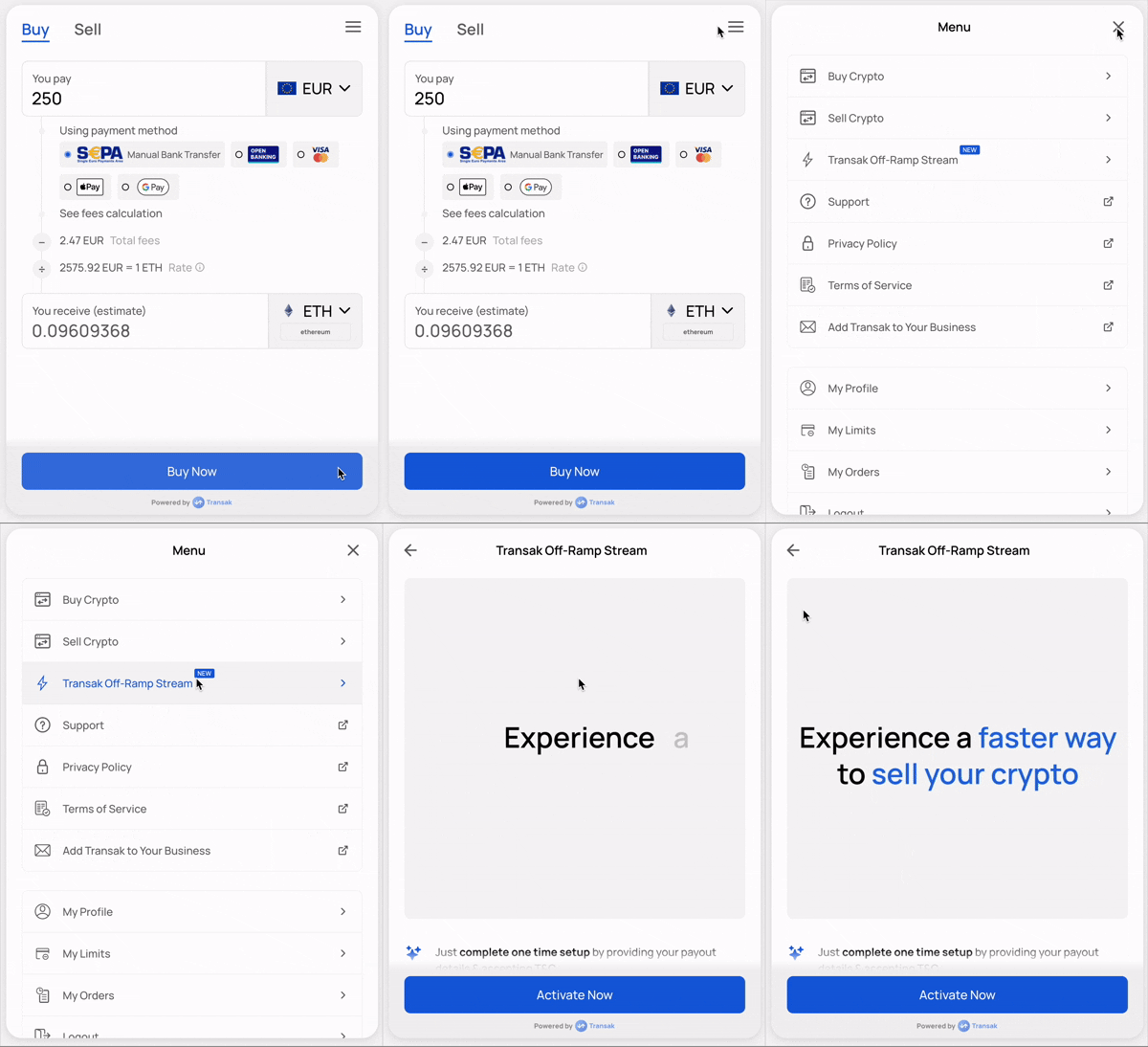
In the Transak Widget, open the Hamburger Menu and click Transak Off-Ramp Stream.

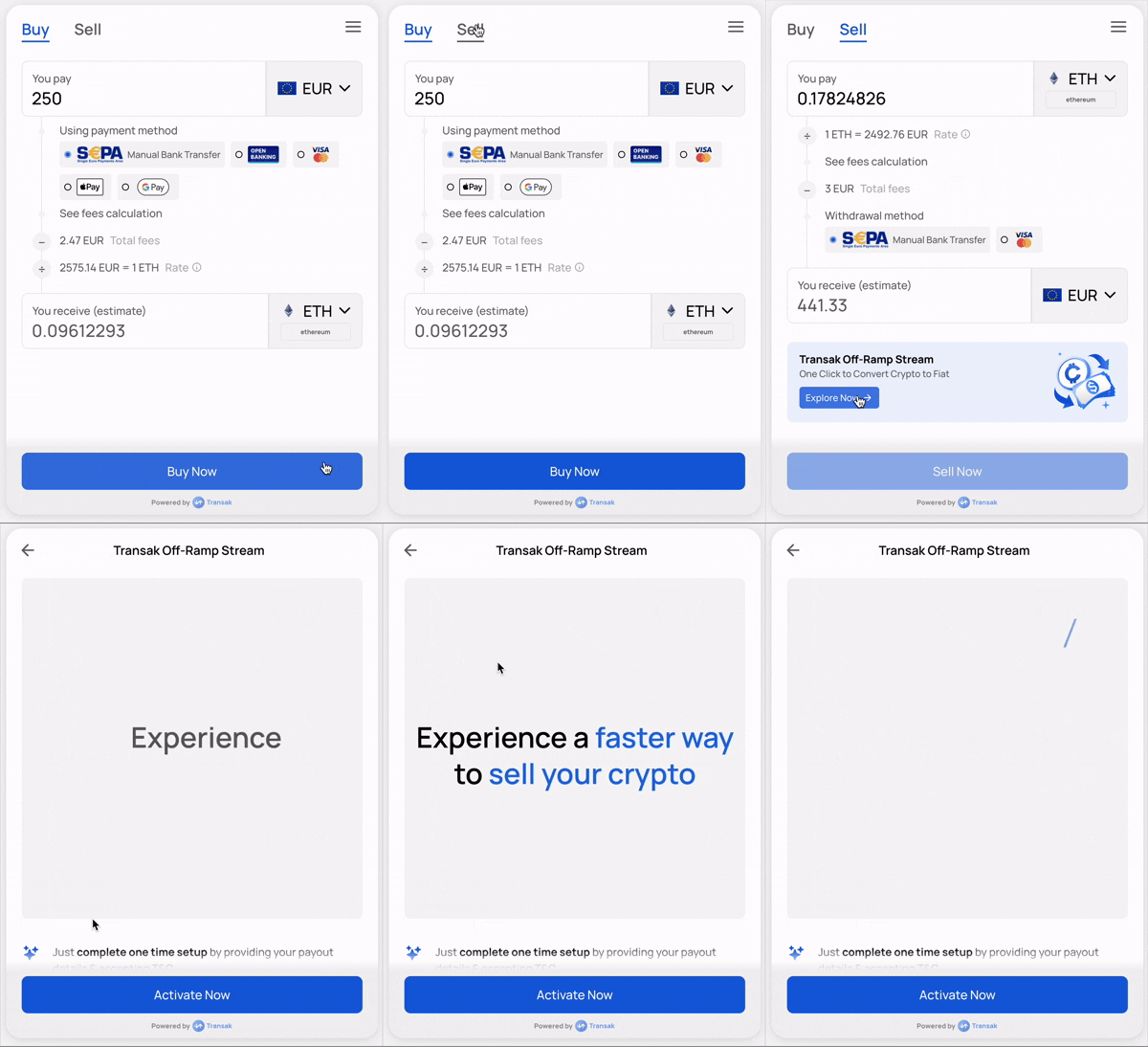
Configure the Transak Off-Ramp Stream wallets by clicking the Explore Now option from the banner.